

HouseCall Pro Forms Speed to Lead
Overview of Speed to Lead for Website Leads to Housecall Pro
The “speed to lead” system is a multi-channel setup designed to ensure that website inquiries are acted upon immediately while the customer is still a “warm” prospect.
1. Instant Lead Capture and CRM Push
When a customer submits a form (e.g., a “Request Quote” or “Website Form”), their contact information is instantly captured and pushed into Housecall Pro. This automated transfer accomplishes two key things within HCP:
- Customer Record Creation: The lead creates a new Customer Contact Information record within the Customer tab in HCP.
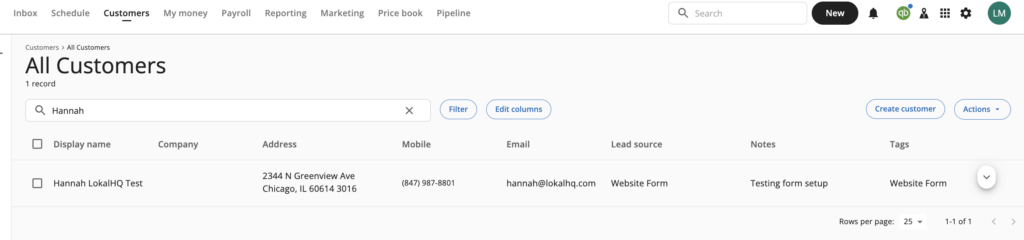
- Lead Tab Entry: The lead also appears as a new entry under the Leads Tab in HCP. This step is explicitly described as not an automatic scheduling but a data push for prompt follow-up.

2. Multi-Channel Notification
In parallel with the data push to HCP, the system sends immediate notifications to the client’s team to ensure speed to lead:
- Email Notifications: Lead details are sent via email to all designated team addresses (e.g., inquiry or info inboxes, or specific team members).
- SMS Notifications: An automated SMS alert is sent to a monitored phone number of the business. These notifications originate from the Lokal notification number, such as +1 855-906-0207. Please note, this phone number is notification only – our team does not monitor replies to this number.
3. Goal and Action
The core purpose is to notify the team across multiple channels so that a customer service representative (CSR) can follow up quickly. The client’s team needs to be actively monitoring all channels (HCP, email, and SMS) to catch the leads as soon as they are received.