


Ever typed ‘AC repair near me’ in Google to see where your HVAC business ranks?
If it’s featured in the local pack (the topmost section that lists HVAC businesses within the area alongside a map), you’ll likely capture at least 70% of all clicks.
That’s about 42,000 clicks out of 60,000 searches every month.
Bonus points if your business also ranks high in local directories like Angi and Yelp; they often appear at the top of the organic search results, just below the Map Pack.
These spots increase your chances of attracting people ready to hire a contractor.
To dominate the local search results for location keywords like these, list your HVAC business in local directories and ensure your information is accurate and consistent across all platforms.
But that’s not all you have to do, which is why we wrote this in-depth guide.
Below, we explain exactly how to do local SEO for HVAC contractors, including examples and actionable tips you can use to dominate local search results and grow your HVAC business.
Table of Contents
What Is Local SEO for HVAC Contractors?
Local SEO for HVAC contractors is a digital marketing strategy businesses use to attract homeowners actively searching for HVAC services within their service area.
Its goal is to help your business rank higher on Google Maps and local search results, ultimately attracting high-intent leads who become customers.
For example, here’s the SERP for “heating repair services in Nashville.”
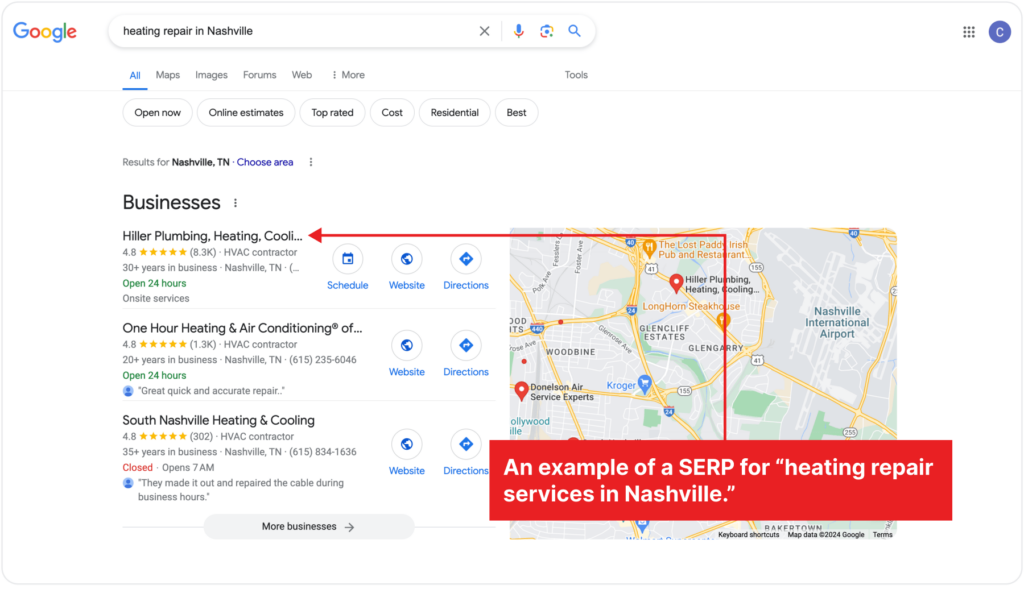
Hiller PHCE ranks in the Google 3-pack and the top three local search results.
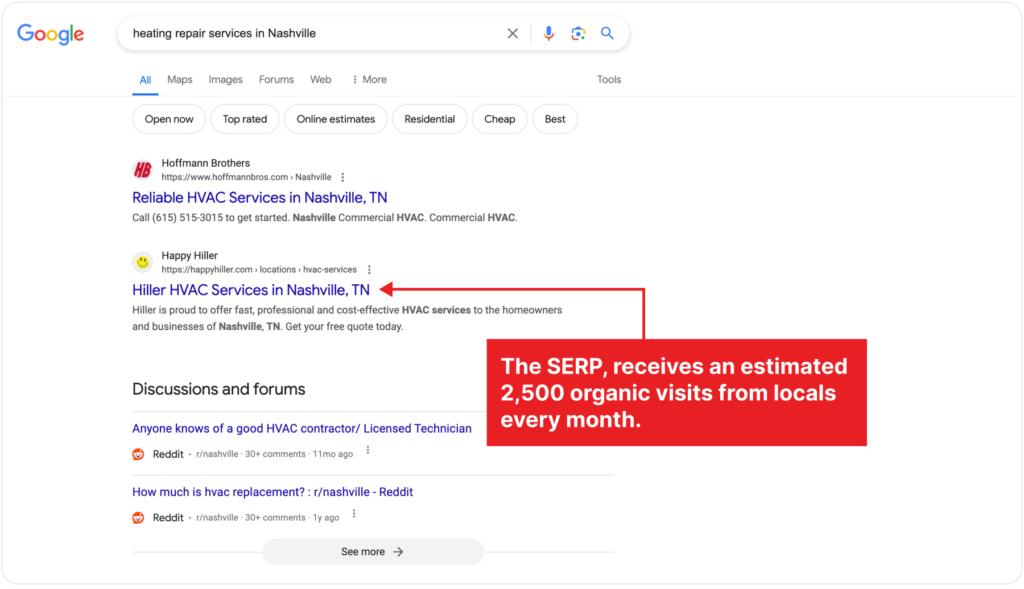
Its Nashville landing page, linked in its GMB profile and the SERP, receives an estimated 2,500 organic visits from locals every month.
(The page also attracts organic traffic from backlinks, social media, and other channels.)
However, if it had not been optimized for relevant local HVAC SEO keywords, Hiller would have paid $37,000 in Google Ads to rank for this keyword, and they would have missed out on attracting customers who are ready to buy.
The webpage also ranks for other commercial and transactional intent local keywords like “HVAC service Nashville” and “Emergency electrician near me.”
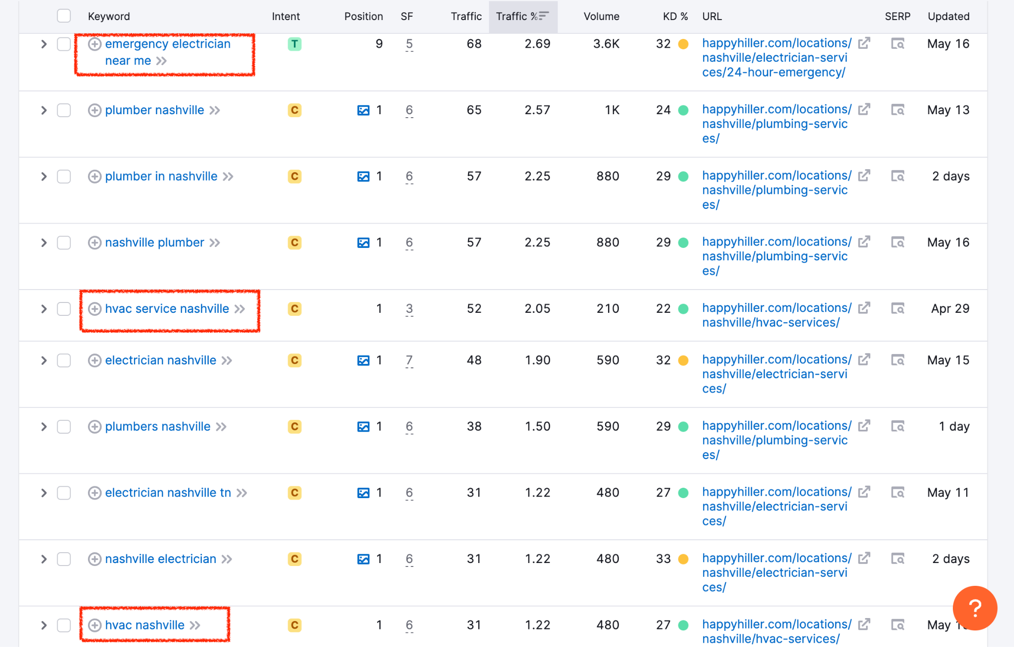
That’s the power of local SEO.
If done right, it places your business where ideal customers who are already searching for HVAC services can’t miss it: in the Google local pack and at the top of the search results.
Why invest in local SEO for your HVAC business?
Investing in local SEO ensures search engines find and rank your HVAC website, Google Business profile, and profiles on other online directories.
This way, potential customers can
- Discover your business online
- Find critical info they need to learn more about your business and contact you
- Read about other customers’ experiences with your business before deciding
Say you want to attract homeowners in Cincinnati Ohio who need AC maintenance services urgently.
A local SEO strategy will help you
- Target phrases like “AC maintenance Cincinnati” or “air conditioning repair near me” to appear in the local search results
- Optimize your Google Business profile with accurate NAP details, business hours, high-quality photos, etc
- Optimize your business listing on local directories like Yelp and HomeAdvisor
- Develop blog posts, articles, and service pages that address local HVAC issues
- Identify advertising ideas that will resonate with homeowners in your local area to support your HVAC SEO efforts
All of these contribute to attracting high-intent customers for your HVAC business.
7 local SEO tips for HVAC contractors
1. Update and optimize your Google Business profile
87% of consumers use Google to find, review, and hire local businesses, making Google Business your most important local HVAC marketing channel.
A well-optimized Google Business Profile increases your business’s chances of appearing in search results and the Map Pack when locals search for HVAC services.
Updating your profile regularly ensures customers have access to the most accurate details about your business and can quickly contact you.
If you neglect to update your profile, Google’s algorithms automatically fill in the gaps with information from other sources, which could be outdated or incorrect.
And this could harm your business’s online reputation.
How to optimize your Google Business profile
If you haven’t already, create your profile (follow the steps here), then claim your business or verify your ownership.
Once completed, fill in your business name, address, phone number, and website URL as they appear on your website and other online listings.
There are three main factors Google uses to determine a page’s local ranking:
- Relevance: how well your profile matches what someone is searching for
- Distance: how far each potential search result is from the location keywords used
- Prominence: how popular a business is based on reviews, ratings, and activity
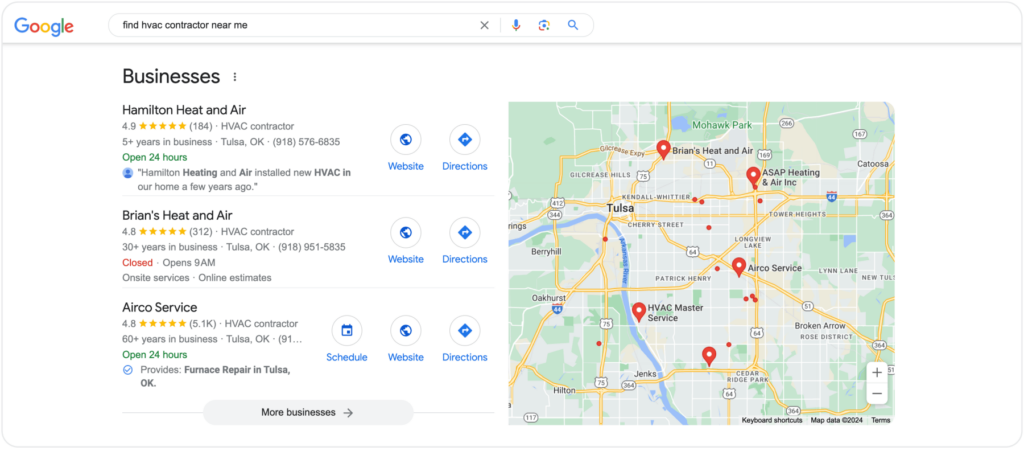
For example, these results show up when we search for ‘furnace repair in Tulsa’:
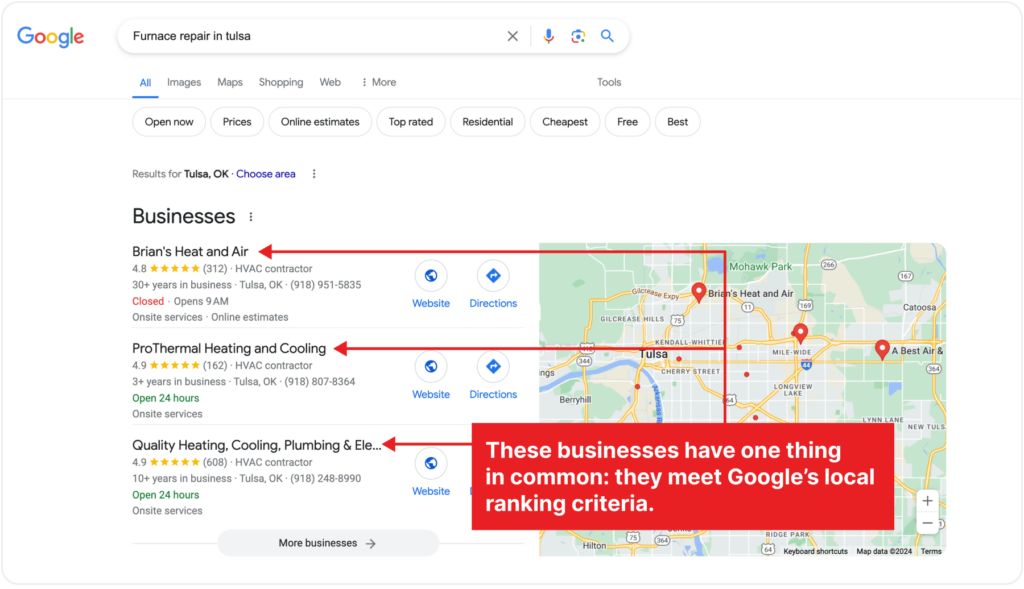
These businesses have one thing in common: they meet Google’s local ranking criteria.
Brain’s Heat and Air has a complete profile with critical business information such as name, address, phone number, business hours, website URL, and service areas.
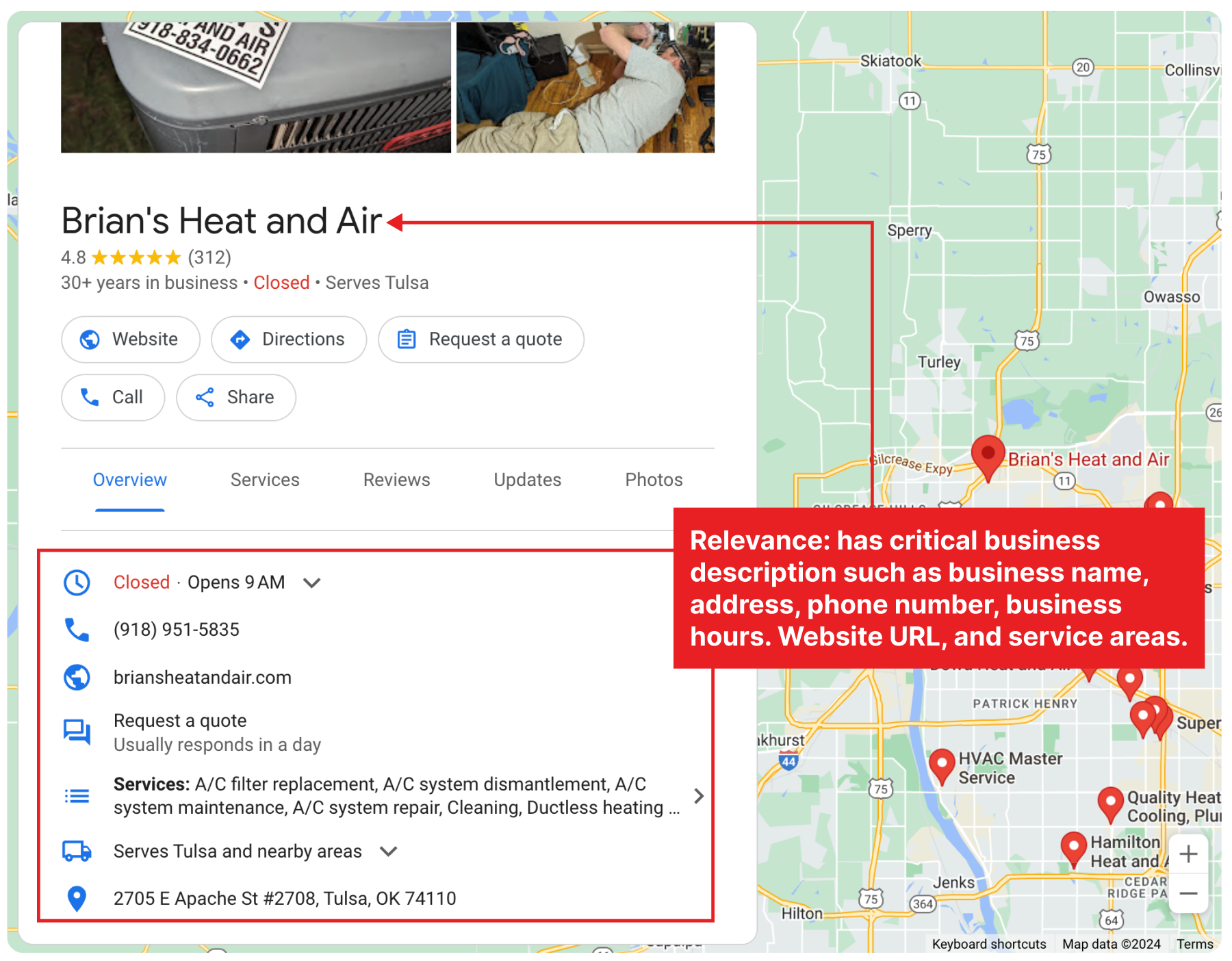
These details help Google determine its relevance to the search query. Plus, they make it easy for prospects to contact you, as 60% of searchers call directly from the search results.
You should also choose your primary category (the one that best describes your business) and add up to 10 secondary categories. Your options include:
- Air conditioning repair service
- Air conditioning contractor
- Heating equipment supplier
- Air conditioning system supplier
- Heating contractor
- HVAC contractor, etc.
Then, like Brain Heat and Air did below, list all HVAC services you offer, with detailed descriptions and prices where applicable.
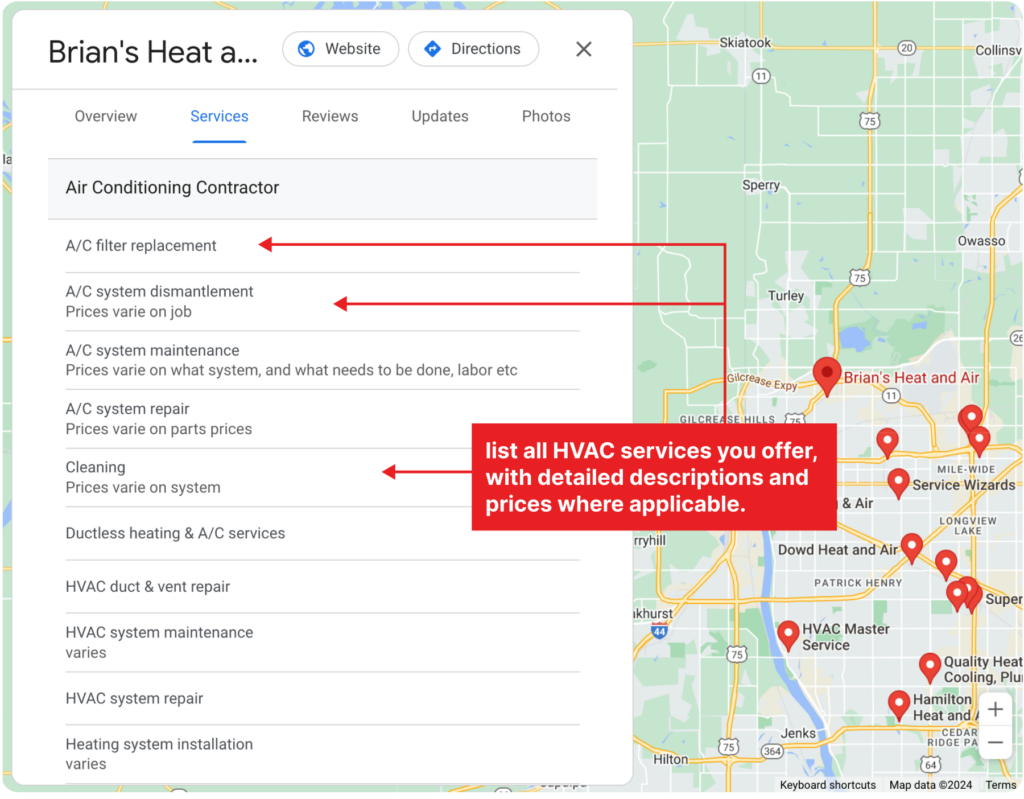
These services act as relevant keywords prospective customers will likely use when searching for HVAC services.
Next, enter your complete address and list all the areas you serve.
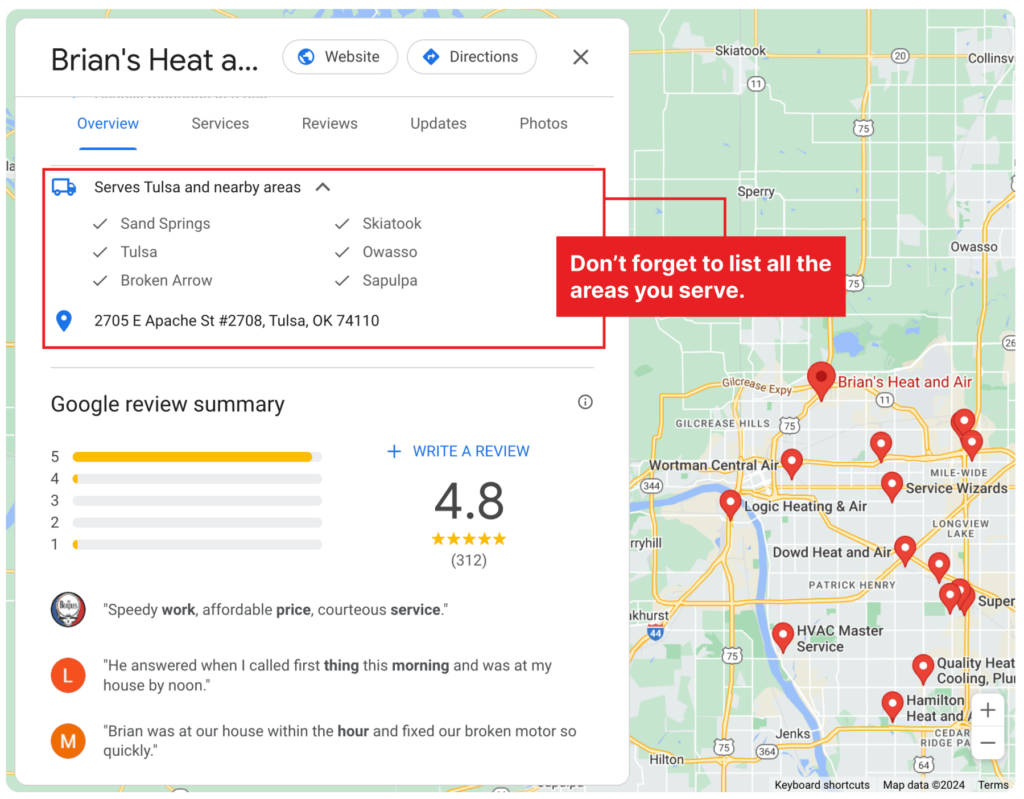
Providing a complete address helps Google accurately place your business on the map. And listing the areas you serve ensures your business appears in search results for customers in those locations.
Both improve your chances of appearing in local search results and Google Maps when potential customers search for services in your area.
Other ways to improve your Google Business Profile search rankings include:
- Use high-quality team photos, before and after images, video testimonials, and other pictures that represent your business well
- Share updates, promotions, and news via Google Posts to keep your profile active
- Monitor and answer questions from customers, then create a FAQ section
- Add a ‘request quote’ button so visitors can book services directly from your profile
- Enable messaging to allow customers to contact you directly
- Include local keywords in your service descriptions to improve your search visibility
- Use relevant keywords in your posts and updates to attract local search traffic
Most of all, regularly review and update your profile information to ensure it remains accurate. This includes updating business hours, adding new services, and changing contact information as needed.
2. List your business in local directories like Yelp, The Home Depot, and Angi
Directories like Yelp, The Home Depot, Home Advisor, and Angi are popular platforms homeowners use to find local businesses, unlike Yellow Pages.
Listing your business on these platforms helps you tap into their user base, increasing your exposure to potential customers.
It also boosts your local visibility, as Google and other search engines pull information from them to display at the top of the search results.
For example, here’s the search results for “affordable HVAC repair near me”:
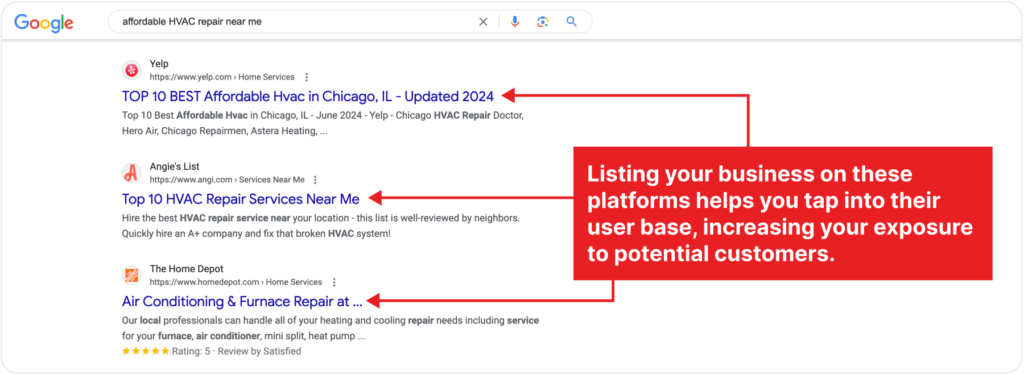
Potential customers can easily compare your services and ratings with competitors, which gives you an edge if your profile is well-maintained and has many positive reviews.
How to optimize your business listings on online directories
Ensure your business information, particularly your name, address, and phone number, is accurate and consistent across all directories, like Apollo Home did.
(Inconsistent information can confuse customers and hurt your local SEO.)
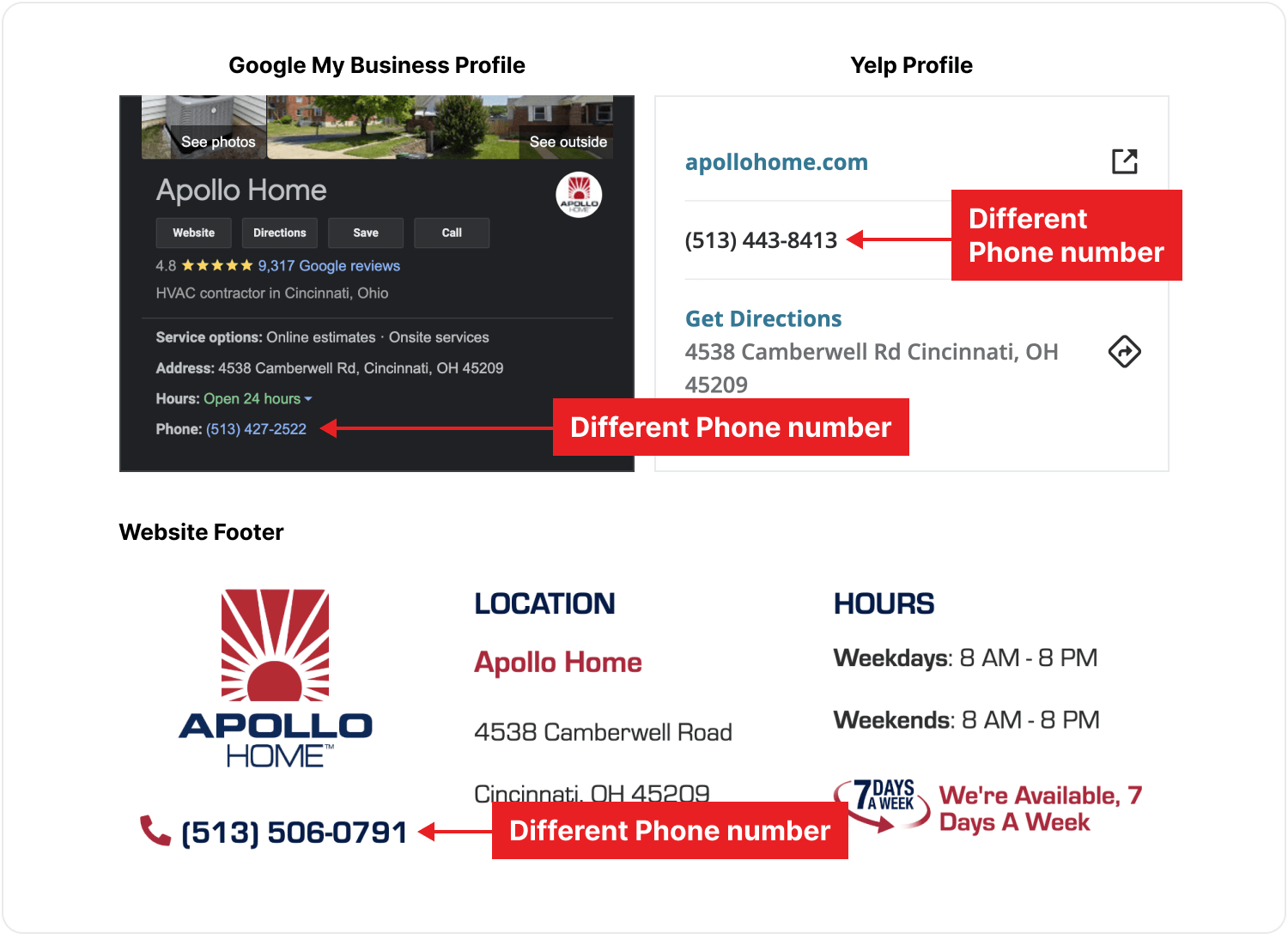
Check if your NAP details are accurate and consistent using Semrush’s free list management audit tool.
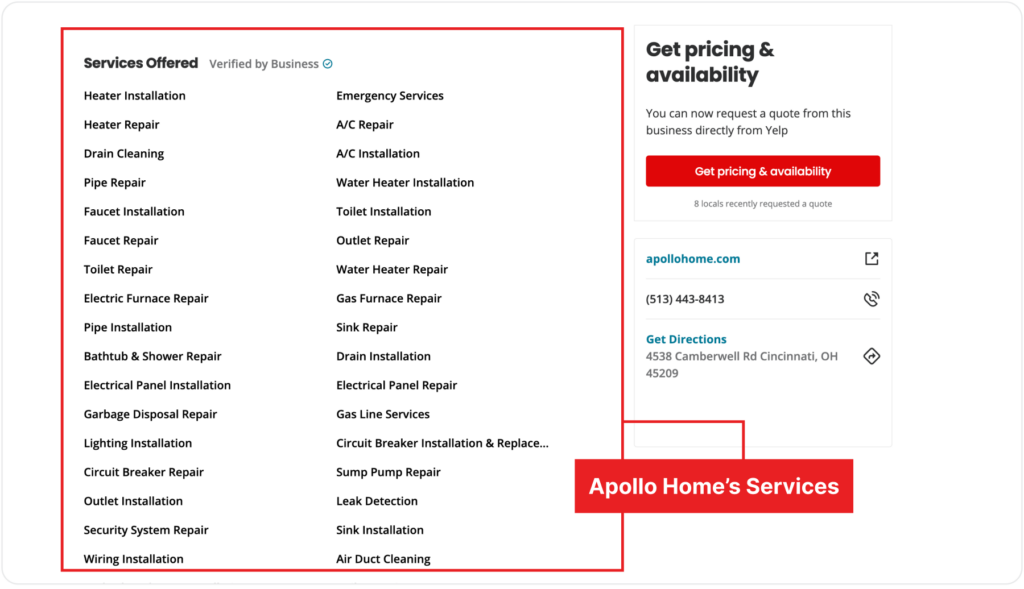
List all the services your business offers so potential customers understand what you can do for them.
These services act as relevant keywords prospective customers use when searching for HVAC services and improve your chances of appearing in relevant searches.
Upload high-quality photos of your team on the job, customer testimonials, and before-and-after images, like Apollo Home did on Yelp.
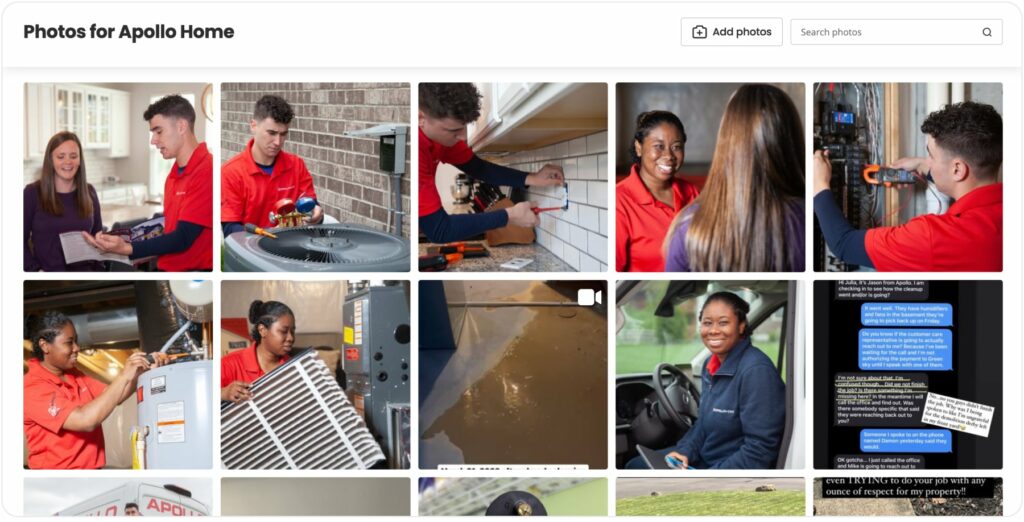
Visual content like this significantly enhances your profile and attracts more customers, especially when it is geotagged.
Search engines like Bing consider geotags to determine the relevance of your webpage to a local search query. (Use this tool and follow the instructions on the webpage to geotag your images before posting.)
Other ways to optimize your profiles on online directories are:
- Incorporate relevant keywords into your business descriptions
- Regularly update your business information, hours of operation, and any changes
- Use tools directories provide for booking services or requesting quotes directly
3. Ask satisfied customers to review and rate your services online
Look at these results for the keyword “hvac repair.”
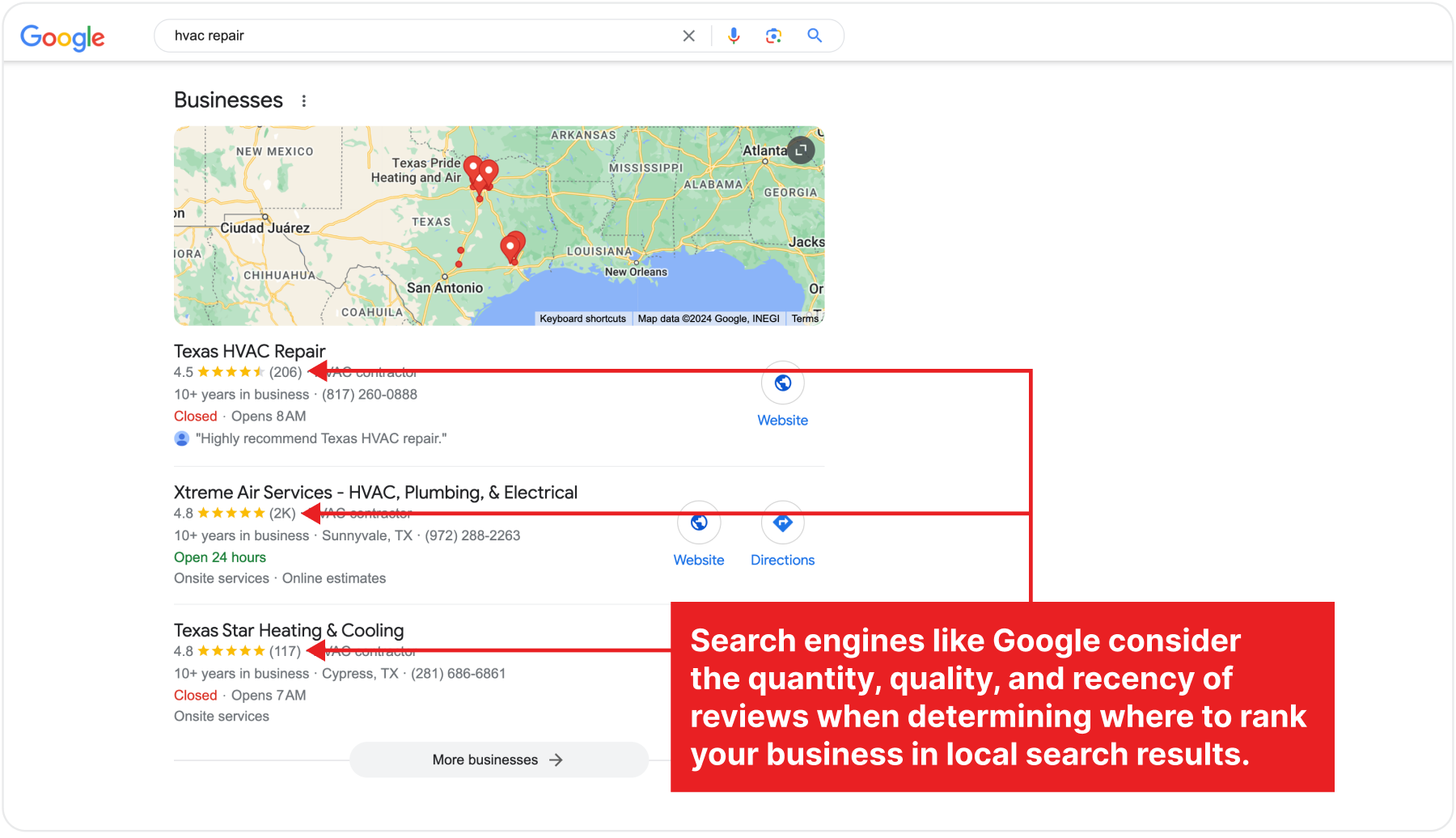
There are two things they have in common: an above 4-star rating and lots of customer reviews.
Search engines like Google consider the quantity, quality, and recency of reviews when determining where to rank your business in local search results.
Positive Google reviews and ratings above 4 stars show potential customers that others have had good experiences with your business. They make customers more likely to trust and choose you.
Online directories also rank local businesses according to ratings.
How to boost local SEO with reviews and ratings
Reach out to satisfied customers via email, phone, or in person to request a review. Personalized requests are more likely to resonate with customers and encourage them to leave a review.
Provide clear instructions and direct links to your business’s profiles on review platforms to make it as easy as possible for customers to leave a review.
Knowing when to ask for a review matters.
Ask for reviews when customers are most likely to be satisfied with your services, such as
- Immediately after a successful job
- Receiving positive feedback
Then, respond promptly and professionally to all reviews, both positive and negative.
Thank customers for positive reviews and address any issues raised in negative reviews.
Engaging with these reviews signals to Google that your business is active and values its customers, which can positively impact your local SEO.
4. Optimize your business listings for voice search
Voice search is becoming popular, with 62% of US residents using voice-activated assistants like Siri, Google Assistant, and Alexa to find local businesses.
Optimizing your business listings for voice-activated search queries can significantly impact your local SEO, making your business more discoverable.
Voice searches are typically more conversational and question-based compared to text searches. Incorporating natural language and long-tail keywords in your business profile can improve your chances of ranking for these queries.
For example, an iPhone user searching for HVAC contractors would likely say, “Hey Siri, can you find an HVAC contractor near me?”
We tried this exact voice prompt and got the results below:
How to optimize your business listings for voice search
Use long-tail keywords that reflect natural speech patterns. For example, instead of “HVAC services,” use “Who offers the best HVAC services in [city]?”
Voice searches work best with an optimized Google Business Profile, so ensure it’s up-to-date with detailed descriptions, service areas, and recent photos.
Incorporate location-specific keywords and phrases in your listings, such as:
- City-specific keywords, like “HVAC repair services in [City Name]”
- Regional keywords, like “Central [State/Region] HVAC installation”
- District keywords, like “Reliable heating repair near [Neighborhood/District]”
- Emergencykeywords like “Emergency AC repair near [Neighborhood]”
Mentioning landmarks, neighborhoods, or local events makes your business more relevant to local searches.
5. Optimize your site’s technical SEO
Technical SEO focuses on aspects of your website that directly affect user experience, such as site speed and mobile-friendliness.
Search engines like Google consider page speed a ranking factor for mobile and desktop searches. Ideally, your web page’s content should load in 2.5 seconds or less.

Apart from page speed, mobile friendliness is another critical local ranking factor, especially with 57% of searchers using mobile devices to find local businesses online.
Google indexes the mobile version of your site to determine your web pages’ rankings.
So, ensuring your site adapts to different screen sizes offers mobile users the same delightful experience as those using desktop.
Optimizing your site’s technical SEO makes your site easily accessible to these crawlers, reduces user friction, and increases visibility and sales for your HVAC business.
How to optimize your site’s technical SEO
1. Increase your website’s loading speed to 2.5 seconds or less
Use image compression tools like TinyPNG or ImageOptim to reduce image sizes without compromising quality.
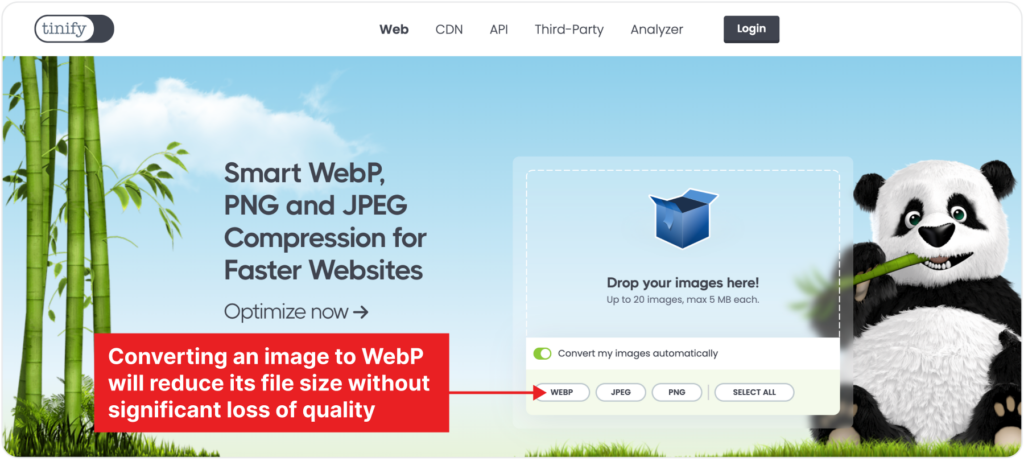
If you’re using TinyURL, drag and drop your PNG or JPEG images into the upload area on the homepage.
You can upload up to 20 images at a time (maximum 5MB each for free users).
Then, choose appropriate image formats like WebP.
If you have a high-quality image in JPEG format, for example, converting it to WebP will reduce its file size without significantly sacrificing quality.
TinyPNG will automatically start compressing your images, typically taking a few seconds per image.
Once compression is complete, download the compressed images by clicking the “Download” button. You can download them individually or as a single zip file.
Replace the original images on your website with the compressed versions. You can do this via your content management system (CMS) or manually through your file manager.
Also, implement the “srcset” attribute in your HTML to serve different image sizes based on the user’s screen size and resolution.
This practice ensures users receive appropriately sized images—a larger image for desktop users and a smaller one for mobile users.
You could also choose lightweight themes and plugins if you use WordPress (or swap it for a custom web design where you have control over speed and your site’s UX).
Also, regularly monitor your website’s performance using tools like Google PageSpeed Insights, GTmetrix, or WebPageTest to spot and fix errors fast
2. Implement local schema markup on your site
Schema markup involves adding specific tags or code to your website’s HTML to provide search engines with additional context about your content.
This markup helps search engines better understand your site’s content, leading to better visibility and local rankings.
Determine which schema types are most relevant to HVAC businesses.
Common schema types include “LocalBusiness,” “HVACBusiness,” “Service,” “ContactPoint,” and “PostalAddress.
Identify the properties within the chosen schema types most relevant to HVAC businesses. These typically include:
- Business name
- Description of services offered (heating, ventilation, air conditioning, etc.)
- Address (including street address, city, state, zip code)
- Phone number
- Operating hours
- Website URL
- Service area or coverage area
- Specializations or certifications (e.g., NATE certification)
Then, add the schema markup to relevant pages on your website, such as your homepage, services page, contact page, or location-specific landing pages.
Use Google’s Structured Data Testing Tool to test your schema markup and identify any errors.
After implementing it (and submitting your business to local directories), monitor your site’s performance in local searches using Google Search Console and Google Business Insights.
3. Ensure your site adjusts well to different screen sizes
First, test your site’s mobile usability with Chrome Lighthouse and address any issues.
Chrome Lighthouse lets you assess your site’s performance to see how well people can navigate your site on mobile and how long it takes to load.
You can access it directly from the Google Chrome browser’s DevTools panel or use the command-line interface (follow the steps here).
Next, use a responsive web design that automatically adjusts your site’s layout and content based on the user’s screen size and orientation (if you don’t already).
Other ways to optimize your site for mobile search are:
- Use a hamburger menu with large touch targets to improve navigation on mobile
- Choose fonts that are easy to read on mobile and format text to be scannable
- Ensure your text colors contrast well with the background for easy reading
- Minimize the number of required fields in forms to reduce user friction
- Use appropriately sized input fields, checkboxes, and call-to-action (CTA) buttons that are large enough and well-spaced for easy tapping with fingers
Follow these steps to optimize your site yourself or hire professionals to do it for you. This way, you can focus on providing excellent service to the influx of new and repeat customers.
Need help improving your site’s design and UX?
6. Add local search keywords to your website copy
People who use queries like “Emergency HVAC services in [location]” need help urgently, so you want to be there to capture them.
The best way to avoid losing qualified leads to competitors is to include these keywords in your website copy.
How to optimize your website copy for local searches
1. Research location-specific search terms
Use tools like Ahrefs to find these keywords. Look out for search terms like “HVAC services in [Your City]” or “air conditioner repair near me.”
2. Once you have these keywords, review your existing copy on every page on your site, particularly your homepage, service pages, blog posts, and contact page.
Semrush has a site audit tool that analyzes your website’s content and highlights areas for improvement.
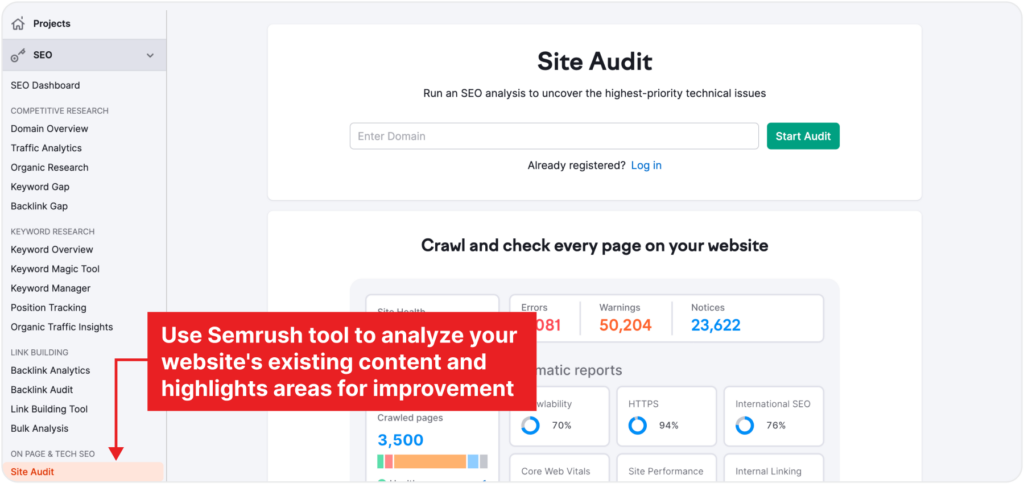
All you have to do is type your site’s URL and start the audit.
You’ll get a report and recommendations for optimizing your site’s content based on your target keywords.
3. Once you’ve identified the pages to optimize and local keywords to include, use them naturally within your web copy.
This includes your homepage, service pages, and blog posts.
For example, if your HVAC business operates in a single (or multiple) location, use the service area(s) in your hero section and elaborate on how you cater to these needs. Logan AC & Heat Services executes this perfectly:
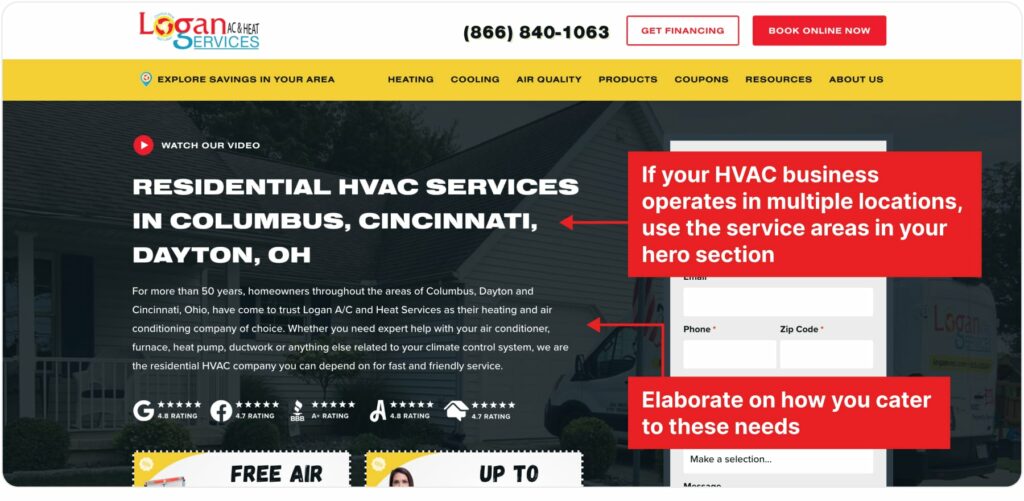
It’s okay to use different wordings; just ensure that your hero section and site title reflect the services you offer and the areas you cover.
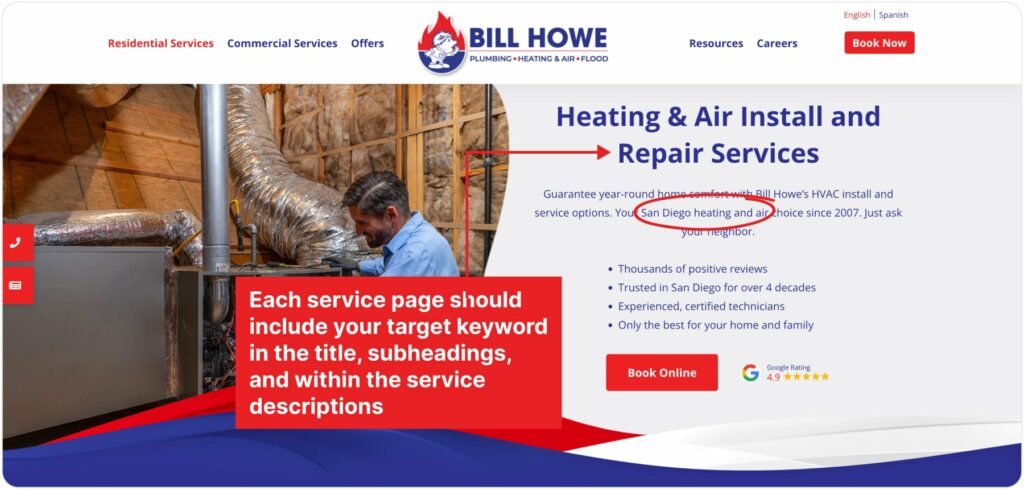
Each service page should include your target keyword in the title, subheadings, and within the service descriptions.
For example, if you offer air conditioning repair services in San Diego, optimize your service page for “San Diego AC Repair Services,” just like Bill Howe does.
If you search using this keyword, the HVAC company’s website dominates the page.

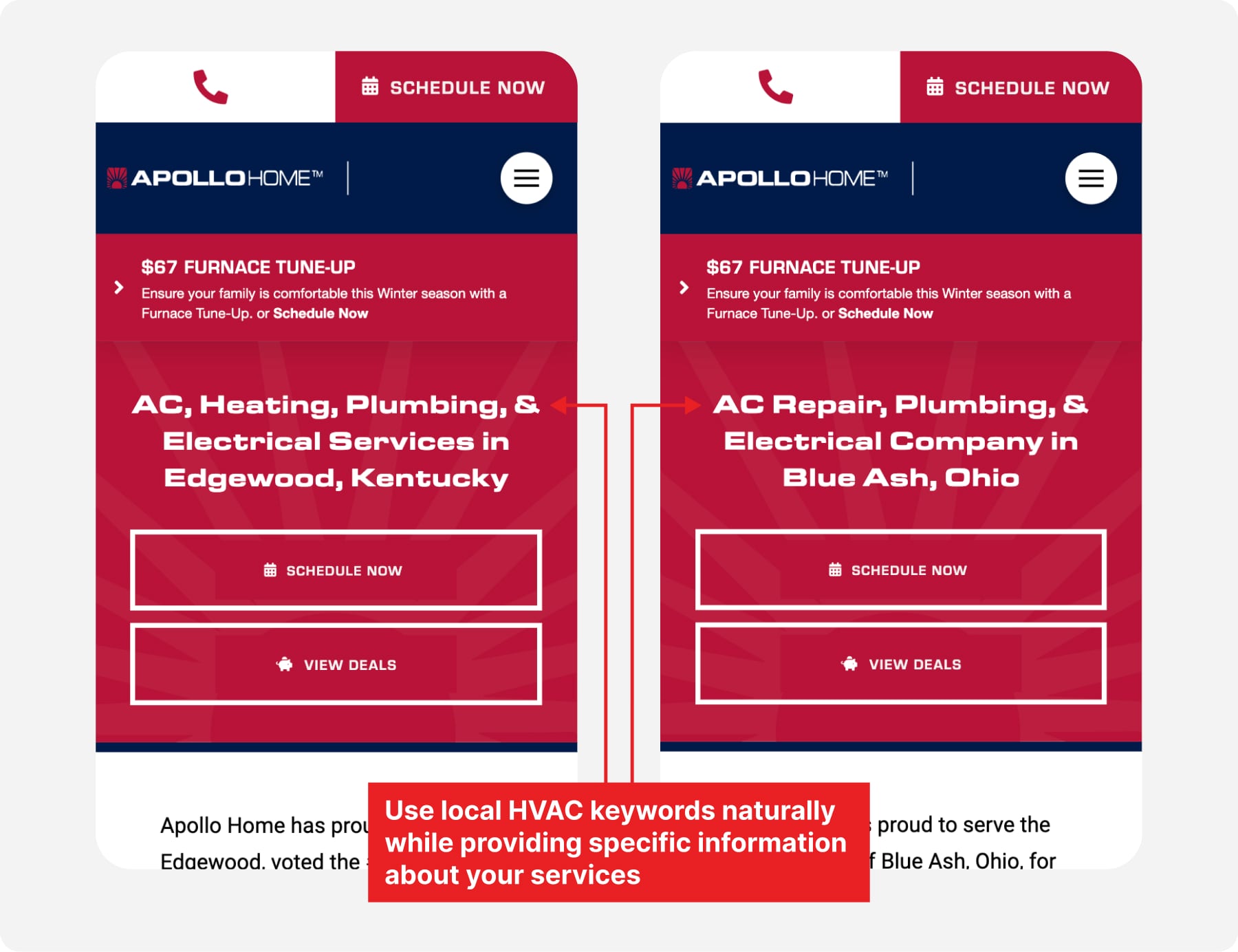
4. Create dedicated pages for each service area if your HVAC business serves multiple locations.
Use local HVAC keywords naturally while providing specific information about your services in each region. Ensure that your business name, address, and phone number are consistent and accurate on all pages.
7. Acquire local backlinks from authoritative websites
Pages with the highest number of total backlinks usually rank best in Google.
That’s because Google uses backlinks to help determine the relative importance and quality of web pages.
When websites with high domain ratings link to your site, it tells Google that your site’s content is credible and useful enough for people searching for the topic.
As a result, those web page(s) with lots of backlinks will rank better than others with fewer. It’s no wonder Google’s top result has an average of 3.8x more backlinks than those in second to tenth place.
How to earn local backlinks
Ensure your HVAC business is listed in local business directories such as Yelp, Home Advisor, and Angi, as these sites have high domain authority.
If possible, look for directories specific to the HVAC industry. These might include associations or trade organizations like
- ACCA (Air Conditioning Contractors of America)
- ASHRAE (American Society of Heating, Refrigerating, and Air-Conditioning Engineers)
- NATE (North American Technician Excellence)
- ServiceRoundtable
You could also join your local Chamber of Commerce. They typically have a member directory that includes links to member websites.
Their event pages often include links to sponsors and participants, so if you can afford it, participate in or sponsor local Chamber events.
Other things you can do to earn local backlinks include:
- Partner with local businesses that complement your services (e.g., real estate agents, and home improvement stores). You can offer to feature each other’s services on your websites with backlinks
- Write and submit press releases about significant business updates, community involvement, or special offers to local newspapers, radio stations, and TV stations
- Join community websites such as Nextdoor—be active and helpful, and share your business information when appropriate
- Ensure your business is listed on social media platforms (e.g., Facebook, LinkedIn, Instagram) and include links to your website
Tip! The quality of backlinks is more important than the quantity. Focus on earning backlinks from reputable and relevant sources, and avoid spammy links, as they can hurt your SEO.
The best way to boost local SEO for HVAC contractors
To increase your chances of ranking higher for local search queries, ensure your business information is accurate and consistent across all online directories.
This includes Google Business, Yelp, Angi, and Home Advisor.
Follow the tips in this guide and monitor your performance in the local search results using tools like Google Analytics, Google Search Console, and Google Business Insights.
Then, tweak your strategy to improve performance, such as optimizing your GB profile, fixing technical SEO issues on your site, etc.
That’s how you
- Dominate local search results
- Improve your online presence
- Attract high-intent leads
- Boost your conversion rates
Want to achieve all four? We’re a data-oriented partner available to help you boost local rankings, so you have more inquiries and appointment bookings. Book a free consultation.
FAQs about Local SEO for HVAC Contractors
How does local SEO work?
Local SEO targets search queries with local intent. These are searches where the user is looking for services, products, or information within a specific geographic area.
Examples include ‘HVAC repair near me’, ‘best HVAC companies in [City]’, and ‘furnace repair in [Neighborhood]’.
How to do local SEO?
– Ensure your Google Business profile is up-to-date
– Use keywords that include your service area throughout your site
– Create guides for local homeowners will find relevant
– List your business in local directories like Yelp and Angi
– Get featured in local news articles and press releases
– Participate in local groups on platforms like Facebook and Nextdoor
– Optimize your website to load quickly on mobile devices
– Create FAQ pages that answer common questions customers likely ask
– Ask satisfied customers to leave a review on your GMB profile and other review sites
– Use Google Posts to share updates, promotions, and events on your GMB profile
– Partner with related local businesses for cross-promotion and backlinks
– Build a strong internal linking structure on your website
How do you advertise your HVAC business?
Promote offers your target audience will find valuable, timely, and trustworthy. Some advertising ideas you can use for your – HVAC business include:
– Seasonal tune-up offers
– Discounted maintenance memberships
– Peak seasons discounts
– Gift card incentives
– Free HVAC system diagnostics
– Trade-in and replacement discounts
– Customer reviews promotion
– Affordable financing options
– Local Search Engine Optimization
– Google Ads
How do I get more customers for my HVAC business?
– Claim and optimize your GMB profile
– Use Google Ads to bid on local HVAC service keywords
– Use engaging content and targeted ads on social media platforms like Facebook
– Offer seasonal discounts on services like heating system checks in the fall season
– Partner with local businesses to cross-promote each other’s services