



“Near me” is not a direct keyword to rank for; it is a modifier that signifies a user’s intent to find suitable local businesses nearby.
For example, instead of typing “AC repair” into search engines, someone looking to hire an HVAC contractor nearby to fix a faulty AC unit will likely type “AC repair near me.”
Since near me searches have transactional or commercial intent (or both), using the modifier and location keywords in your web copy, content, and local listings like GBP is the best way to ensure Google sees your content as relevant and shows it to locals.
This way, when people use their mobile devices with GPS enabled to search for HVAC services nearby (half of internet users already do this), you have a higher chance of:
- Getting featured in Google 3-Pack (among the top local three business listings)
- Capturing visitors with high buying intent
But that’s not all you have to do.
Below, we show you exactly how to rank for near me searches at the top of the local map pack and organic search results. These tips are based on examples from local businesses that have had success outranking competitors for these keywords.
Table of Contents
1. List and optimize your Google Business Profile for near me searches
You’ve probably heard this line many times before.
Your Google Business Profile (GBP) is your most important digital marketing channel. It gives local searchers their first impression of your home service business.
Since Google Maps results show before organic results for near me searches, a complete GBP increases your chances of ranking higher in the map pack and capturing 70% of all clicks.
It also:
- Lets customers easily find your business hours, contact information, and address
- Allows satisfied customers to leave reviews, which helps to build your reputation
- Gives you a chance to manage negative reviews and protect your brand image
How to optimize your Google Business Profile to rank for near me searches
There are three main factors Google uses to determine a page’s local ranking:
- Relevance: how well your GBP matches what someone is searching for
- Distance: how far each search results is from the location keywords used
- Prominence: how popular a business is based on reviews, ratings, and activity
To improve your chances, create, claim, and verify your Google Business Profile, if you haven’t done so already.
Then,
1. Complete all sections of your profile
This includes your official business name, address, and phone number. If your business name includes your primary service (e.g., “Quick Fix Air Repair“), that can help increase keyword density, which in turn can improve your local SEO.
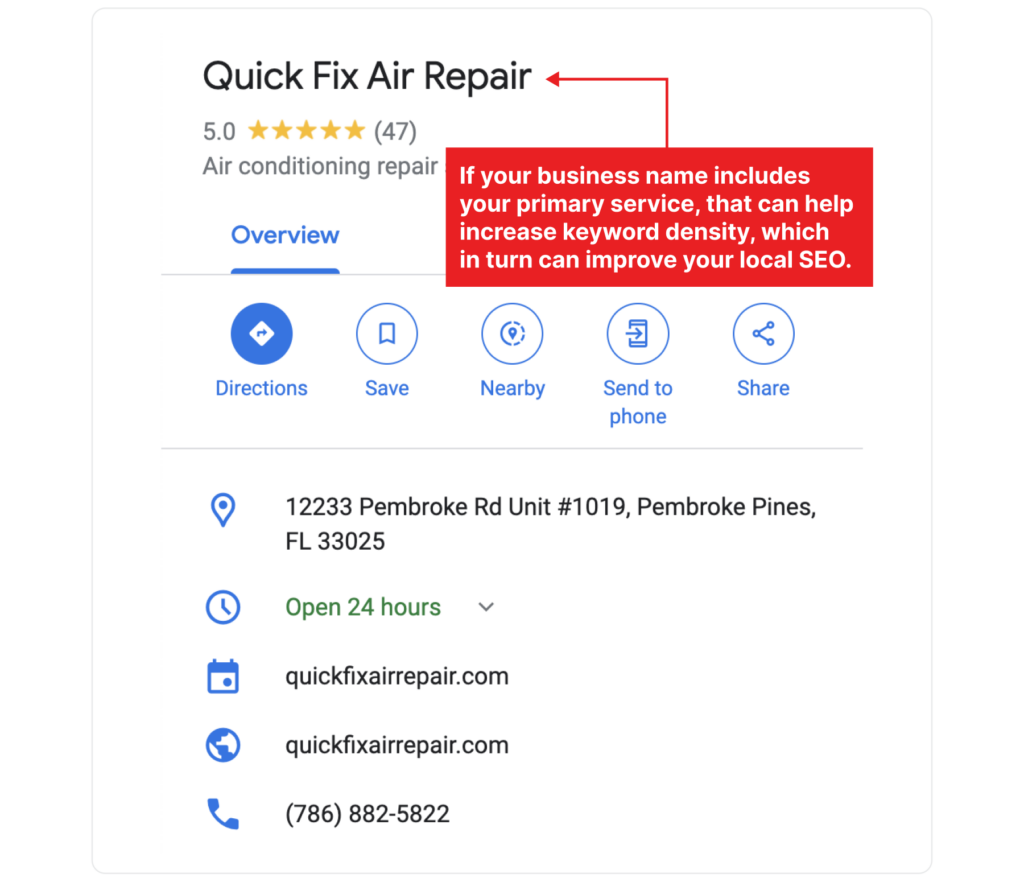
If not, consider getting a “doing business as” name that naturally incorporates one primary service SEO keyword into the title (just like the above example).
Ensure your address, local phone number, website URL, and operating hours are accurate and consistent across all local listings and social media profiles.
If your business does not serve customers at your physical address, you should not enter an address under the “Info” tab in the Business Profile Manager. Instead, enter the areas you serve by specifying cities, neighborhoods, or zip codes.
Also, ensure that the website page linked in your GBP is a location page for your primary service area. Linking to a location-specific page signals to Google that your business is relevant to searches conducted in that area.
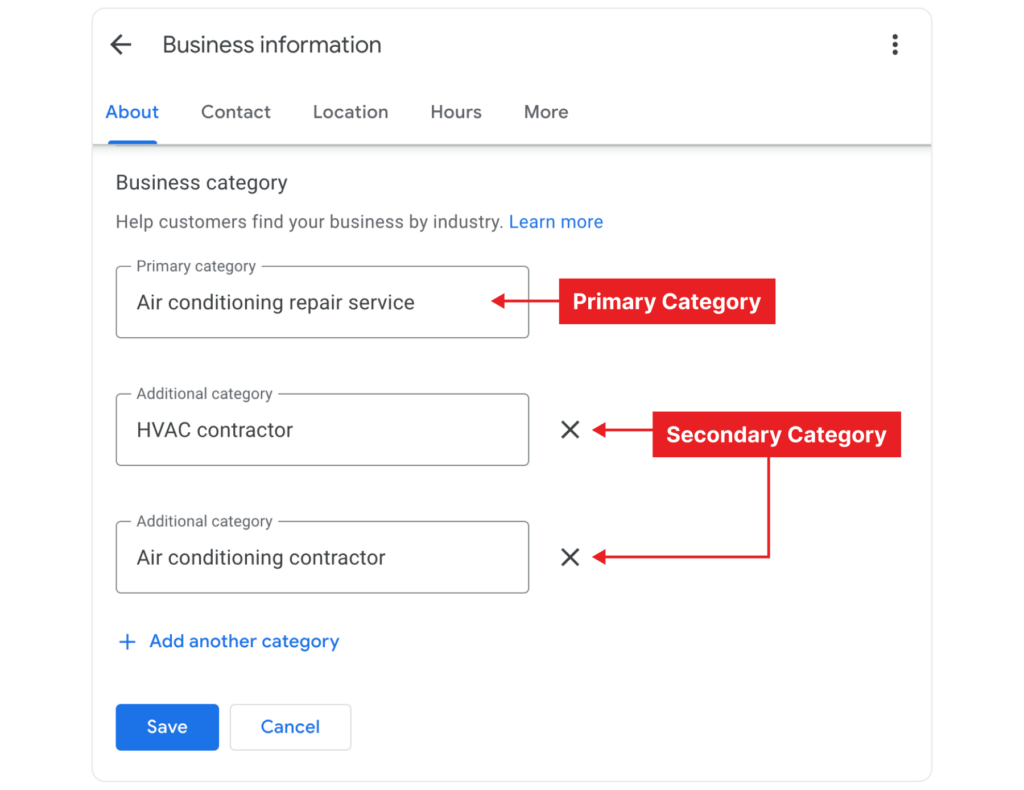
2. Choose the category that best describes your main service
For example, if you offer AC repair services, select “Air conditioning repair service” or “Air conditioning contractor” as your primary category like these businesses:

Then choose additional categories to provide more context about your services, such as AC system repair, install AC, etc. Like Quick Fix Air Repair did here:
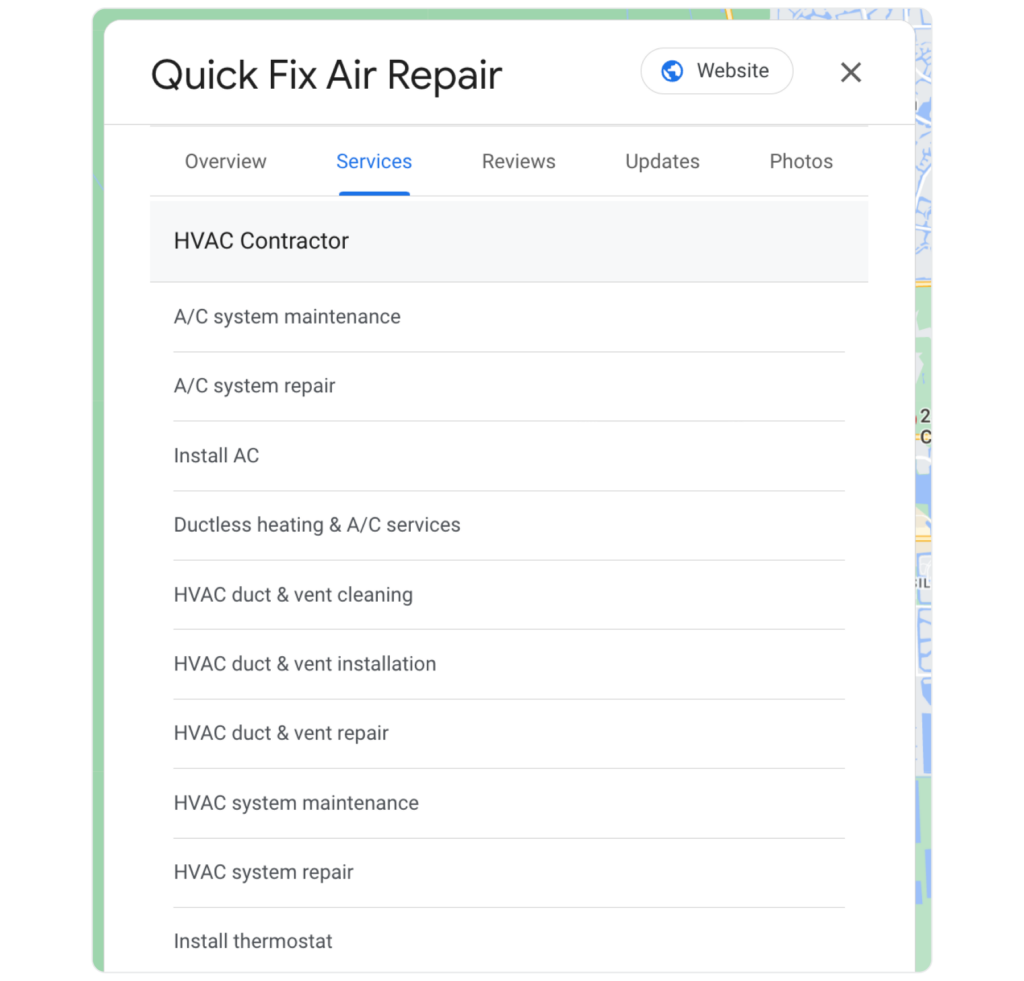
If you don’t know which categories to select, research your top 3-5 competitors in your service area. Chances are, they all have the same primary and similar secondary categories. You can add these services to your GBP using this guide.
3. Write a compelling business description
Clearly describe what your business does and include location-based keywords naturally.
Here’s what Quick Fix Air Repair’s description looks like to inspire yours:
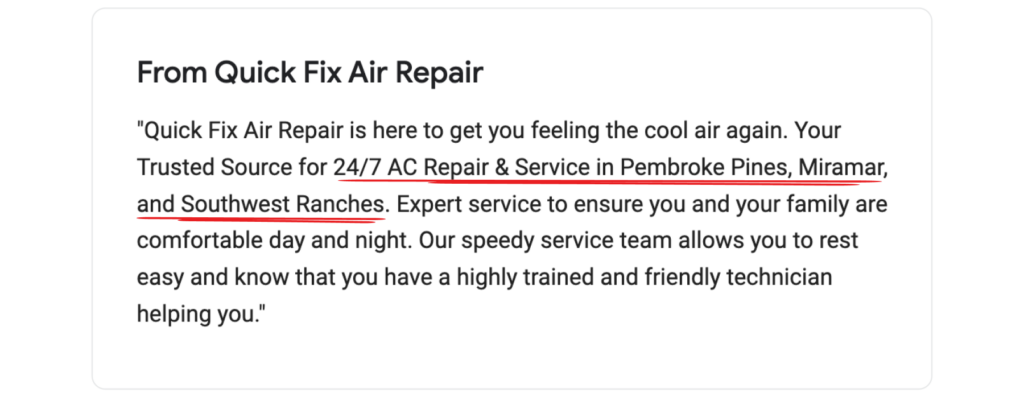
The description has a 750-character limit, so make sure to be concise and to the point. Include key information about your business.
You should also consider weaving service and location keywords into it to increase your chances of ranking higher on Google Maps. All Service A/C & Plumbing does this well:

Other tips to keep in mind when writing your GBP description:
- Mention what makes your business unique or special. This could be your years of experience, emergency or same-day services, or core services you offer.
- Write in a way that is easy to read and understand. Use natural language that potential customers will find engaging.
- Encourage potential customers to take action, such as visiting your website, calling your business, or stopping by your location.
4. Upload high-quality photos
High-quality photos help your profile stand out and appear more appealing to potential customers. Consider including on-the-job images to show you and your team in action regularly, like Quick Fix Air Repair does.
Requirements for each photo:
- A person
- A face
- A smile
Optional items for each photo:
- Logo / Branding
- Pets
- Tools

This helps to humanize your business and show customers what to expect.
You could also add exterior and interior photos to show what your business looks like in and out, as well as group team photos.
And ask customers to add photos to their reviews.
Photos from real customers are perceived as more authentic and trustworthy than professional photos. They show potential customers that others have had positive experiences with your business, which improves their trust and confidence.
Plus, these reviews and photos are often posted from the customer’s home, so they’ll likely include metadata such as geotags.
This helps improve the local relevance of your business profile and helps search engines understand that your business is actively serving the local area.
Pro tip: When interacting with customers in person, politely ask them to leave a review and include photos.
For example, after completing a service, you could say, “We’d love to hear your feedback. If you enjoyed our service, could you please leave a review and add any photos you might have taken?” You could also ask via email.
5. Encourage and manage customer reviews
Create a system to get reviews from customers consistently.
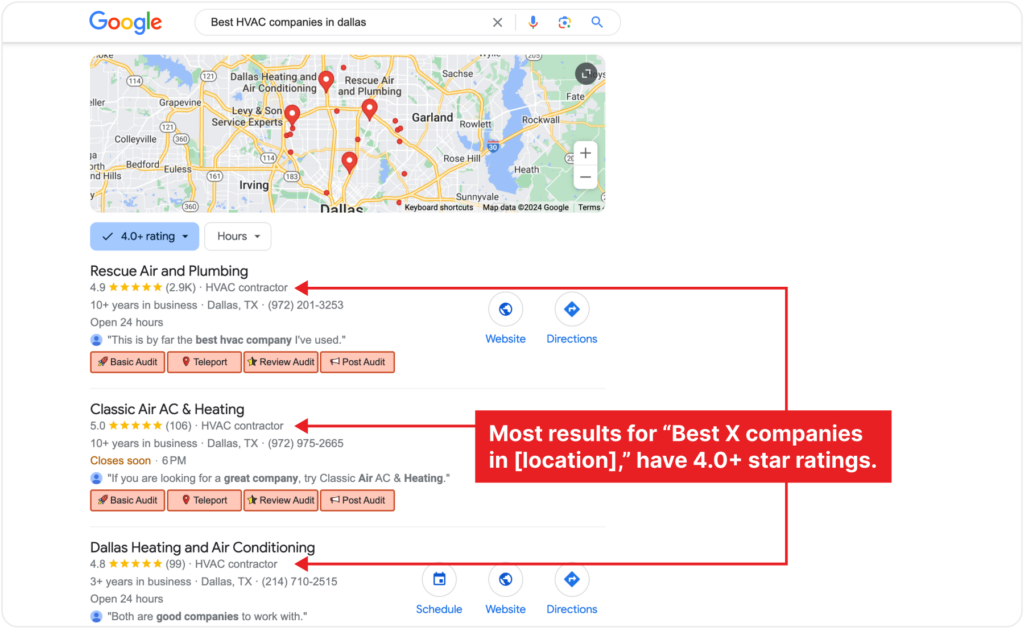
Reviews are a significant factor in local search algorithms, and having a steady stream of positive reviews can boost your visibility in near me searches.Google considers the quantity, quality, and recency of reviews when determining where to rank your business in local search results. Positive Google reviews and ratings above 4 stars increase your chances of ranking higher in the map pack.
Use tools like Synup or GoReminders to automate and collect Google review requests.
These platforms can send out review requests via SMS or email right after a customer interaction. Plus, you can integrate them with your CRM and send text and email reminders, in case a customer forgets to leave a review.
Both tools offer a 14-day free trial you can use to test the tool, and they’re budget-friendly compared to popular ones.
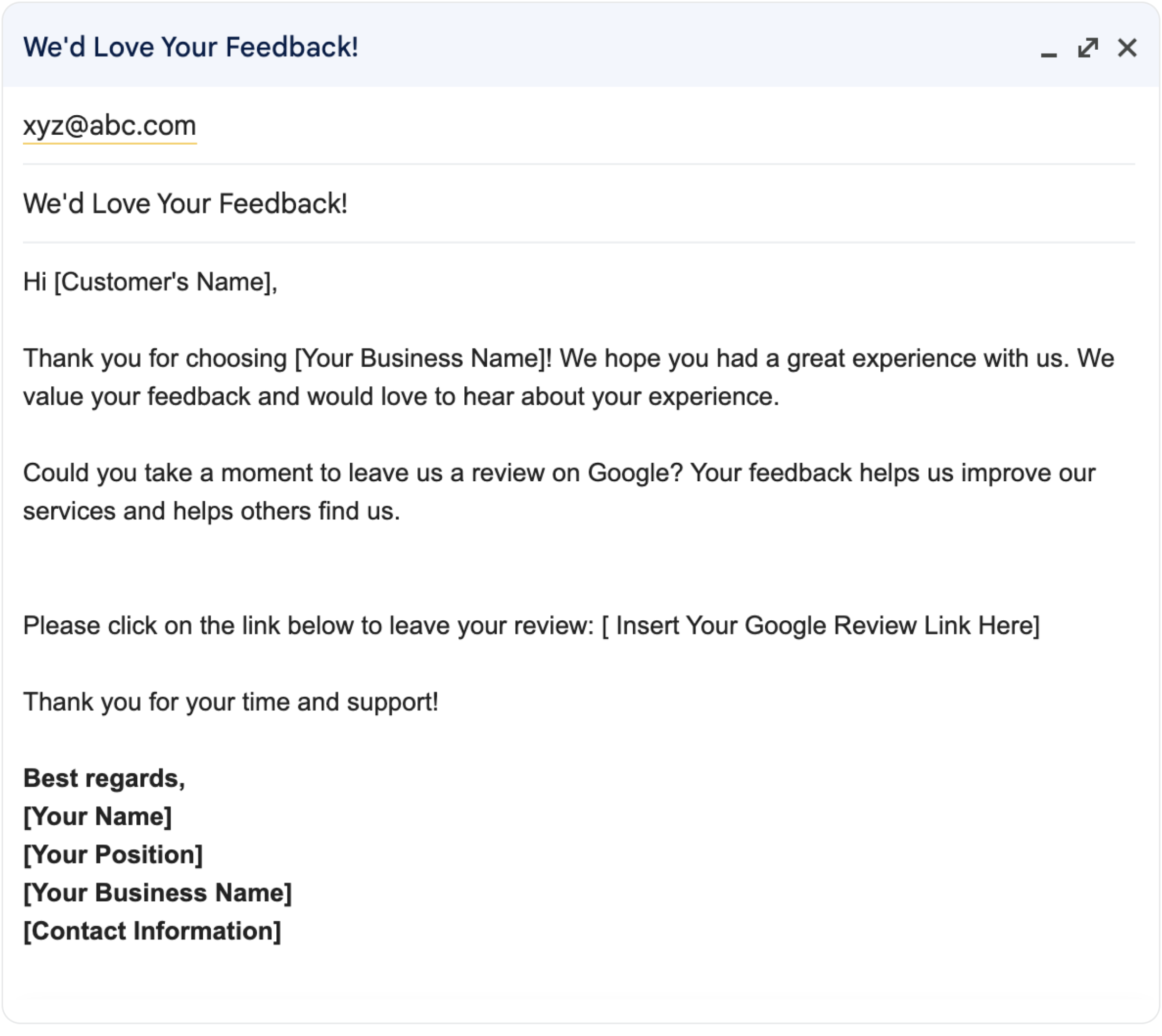
If you prefer to stick with the good ol’ email, go to your business profile using Google Search or Google Maps to find your review link.
From your profile, click on “ask for reviews” if you’re using Google Search. If you’re searching for your business via Google Maps, select customers > reviews > get more reviews. Then create a custom email and share the review link with customers directly.
Here’s an example email:
Request reviews at peak satisfaction moments, such as right after completing a job where the customer expressed satisfaction.
You should also respond to every review, both positive and negative.
For example, instead of saying “thank you” to a positive review, offer a detailed reply like
John, thank you for your wonderful review! We are thrilled to hear that you had a fantastic experience with us and that your new air conditioning system works perfectly. We appreciate your kind words about our professionalism and timeliness. It’s great to know that you’re more comfortable at home now! If you need anything else, don’t hesitate to reach out.
If possible, ask clients directly to leave reviews from their homes. Or target emailing them and sending follow-up messages when they’ll most likely be at home.
The location data embedded in their review can help Google understand where your satisfied customers are located.
Plus, if multiple customers from a specific location leave reviews, Google can associate your business with that location, signaling that you are relevant to searches in that area.
Other ways to optimize your GBP to rank for near me searches include:
- Leave consistent (daily, weekly, or monthly) updates that talk about your core services (top three)
- Look at other HVAC companies in your service area to see what makes them rank. What are they doing that you aren’t doing yet?
- Use listing management tools like Semrush Listing Management tool to ensure name, address, and phone number (NAP) accuracy on citations across the web
- If your business has multiple locations, create separate Google Business Profiles for each location. This way, you can optimize them with location-specific keywords, helping each profile appear in relevant local searches. Hiller Plumbing, Heating, Cooling & Electrical Services does this well:

Following these steps, we helped Quick Fix Air Repair and this resulted in
- 98% increase in “near me” visibility within its service areas
- 180% increase in visibility on Google Maps
- 200% increased share of voice (SoV) in primary service areas
2. Optimize your service pages using near me and location keywords
Google prioritizes relevance when choosing web pages to rank.
Using near me modifiers signals to the search engine that your business is relevant to local search queries, improving your chances of driving high-quality traffic.
For example, One Hour Heating & Air Conditioning includes the keyword, “HVAC near me,” in its meta title (a keyword with 110,000+ searches every month).
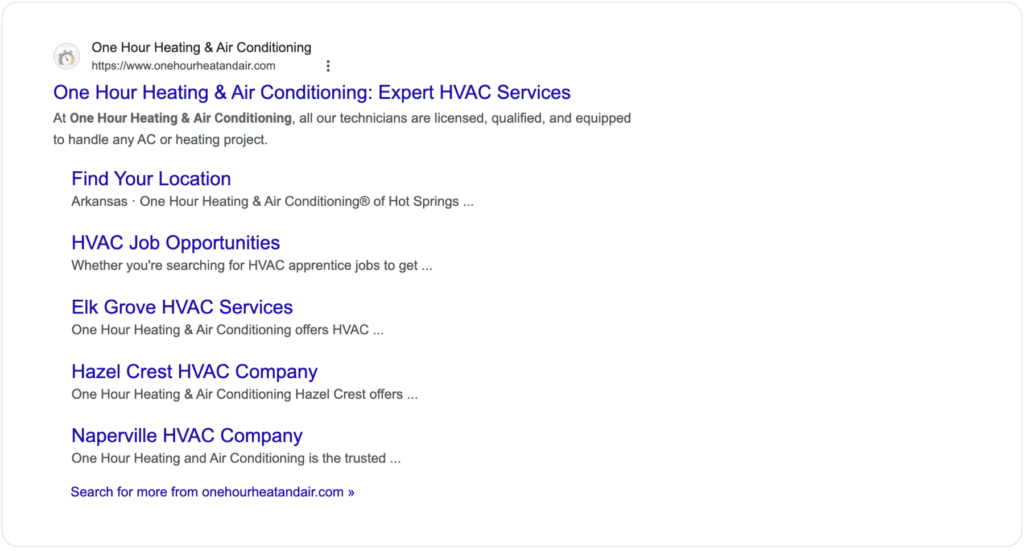
The web page also ranks for a couple of others near me keywords, such as:
- AC repair near me (60,500 monthly searches)
- Heating and cooling near me (60,500 monthly searches)
- Air conditioning repair near me (40,500 monthly searches)
- HVAC service near me (18,100 monthly searches)
As a result, the webpage drives a total traffic of 238,000+ visitors every month.
If your business serves multiple locations, creating separate web pages for each location also helps your local HVAC SEO strategy.
Apollo Home serves multiple locations and has different web pages for each location.
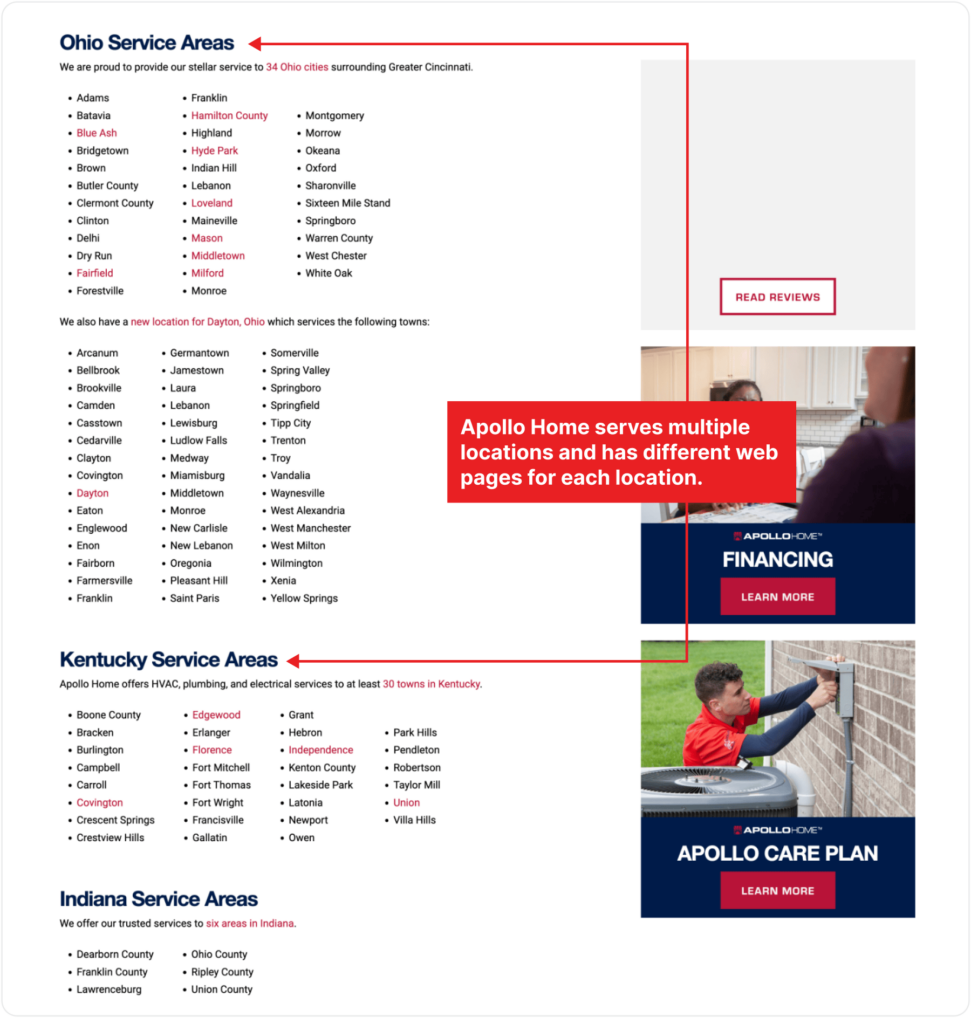
Its Cincinnati landing page ranks for the geo-targeting keyword, “HVAC Cincinnati,” which has almost 900 searches each month.
The company includes the keyword in its meta title and description:
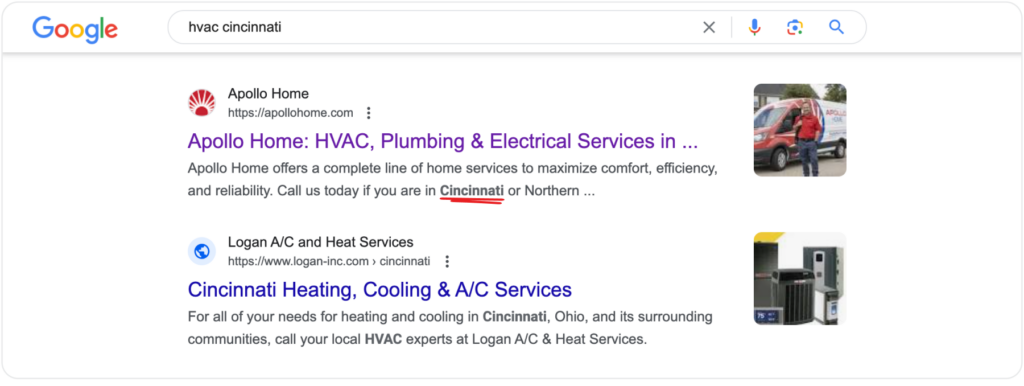
Users searching for near me queries are usually looking for immediate solutions nearby.
Including these modifiers in your meta titles and descriptions directly addresses this intent, making your content more likely to be clicked on by local users.
Apollo Home also uses variations of the location keyword in the webpage title (the one that appears when you hover over your browser tab) as well as the hero section.

You also find the location mentioned up to five times in the web copy.
These variations include long-tail keywords, which are specific and less competitive, making it easier to rank for them.
So, adding them to your web page titles, headings, and content helps search engines and users quickly understand that your business serves their area.
How to optimize your service pages to rank for near me searches
1. Use tools like Ahrefs or Semrush to find local keywords.
Combine your main service keywords with location-specific terms, such as “HVAC repair near me,” “AC installation in [City],” and “heating services in [Neighborhood].”
(Need inspiration? We created this list of 100+ HVAC SEO keywords to rank for.)
2. Include these local keywords in your title tags and meta descriptions
Here’s an example to inspire yours:
Meta Title: “Reliable HVAC Services in [City] | AC Repair Near Me”
Meta Description Example: “Looking for HVAC services in [City]? Our expert technicians provide top-quality AC repair, installation, and maintenance. Call us now!”
Also, include them in your headings tags. For example: “Professional HVAC Services in [City]” (H1), “Why Choose Our [City] HVAC Technicians?” (H2)
And mention local landmarks, neighborhoods, and specific services you offer in your body copy. For example, you could say, “Our HVAC services in [City] cover all neighborhoods, including [Neighborhood A] and [Neighborhood B]”
3. Create blog posts relevant to your local audience
Local blog posts allow you to naturally incorporate relevant local keywords and attract homeowners in your service area(s).For example, One Hour Heating and Air Conditioning created a Faulty Thermostat guide for Pompano Beach homeowners (one of its service areas).
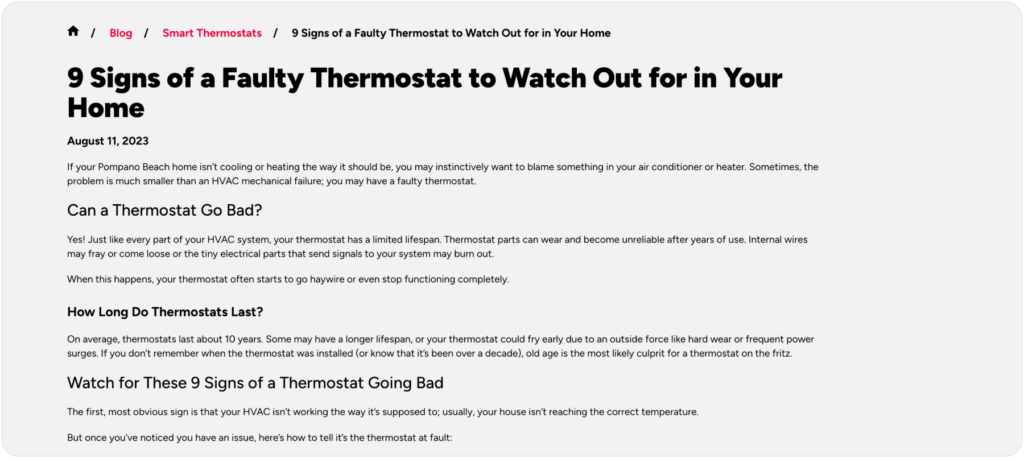
The year-old blog post currently drives 2,500 monthly sessions and dominates the organic results for long-tail keywords like:
- Bad thermostat symptoms (2,400 monthly searches)
- Thermostat fault symptoms (1,300 monthly searches)
- Faulty thermostat symptoms (590 monthly searches)
- Thermostat failure symptoms (320 monthly searches)
- Signs bad thermostat (720 monthly searches)
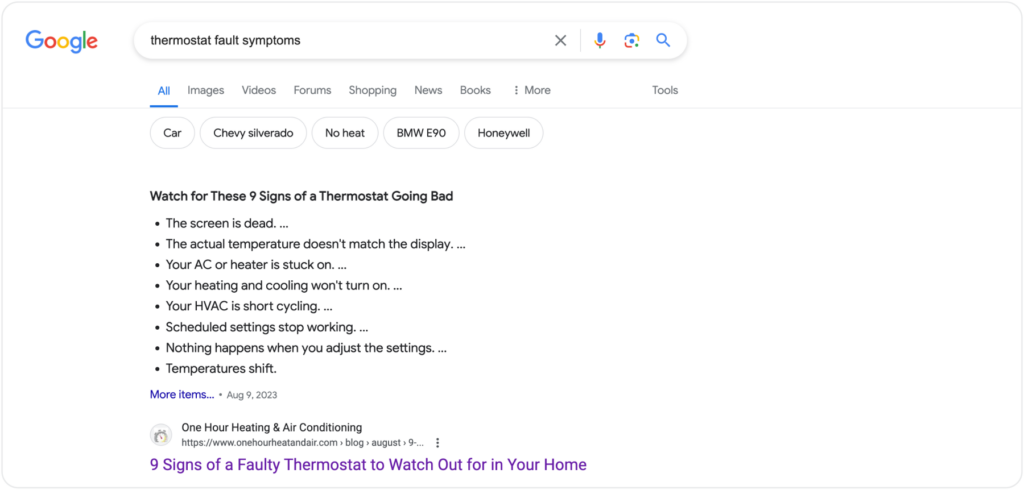
August (which is the month this piece targets) is typically one of the hottest months of the year, especially in warm climates like Pompano Beach.
With air conditioning units running frequently, thermostats are under more strain.
This increases the likelihood of malfunctions, making homeowners more likely to seek information on diagnosing and fixing thermostat issues.
So it makes sense for One Hour Heat and Air to publish a guide that answers frequently asked questions and concerns locals have on the topic.

They also encourage readers to contact the business for professional help vs fixing it themselves.
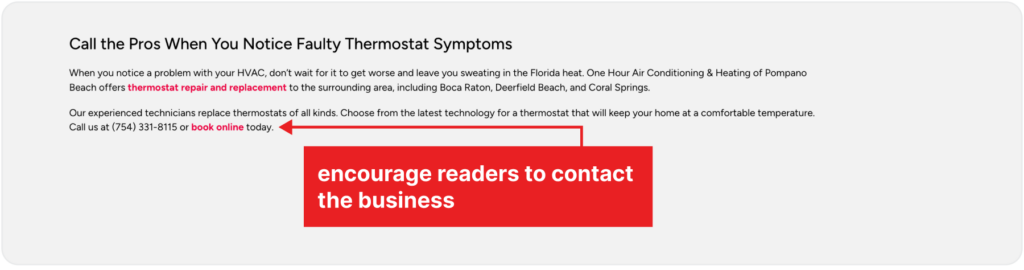
HVAC systems are complex and can be dangerous if not handled properly.
Encouraging professional help ensures that the issue is diagnosed and repaired correctly by trained technicians, reducing the risk of injury or further damage.
Simply put, it saves homeowners the risk of spending more money to fix an issue they created compared to calling professionals to fix it from the get-go.
How to Create Effective Local Blog Posts
Write about local events, news, and seasonal activities.
For example, you could write about how to prepare your home for summer or winter.
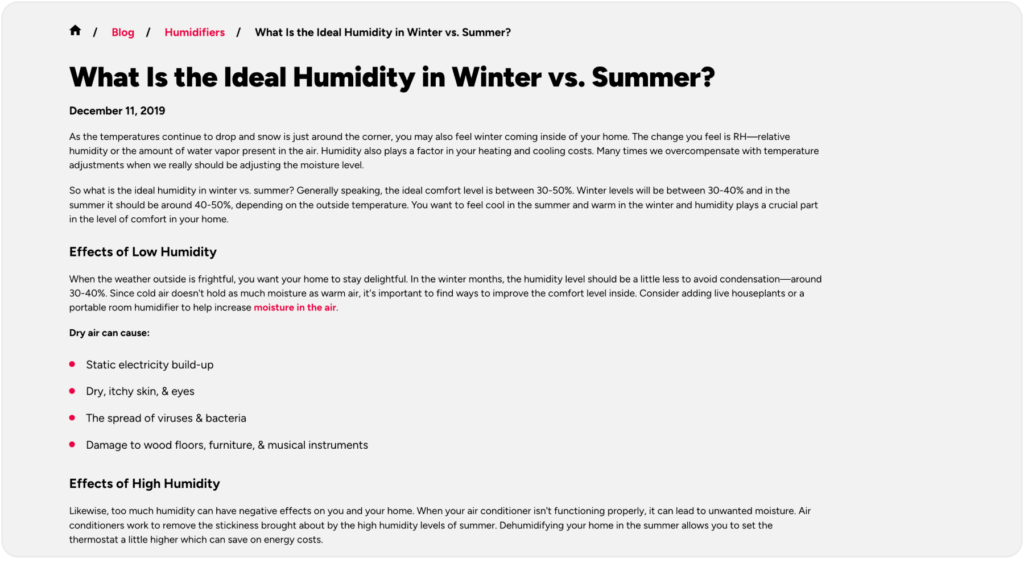
Like One Hour Heat and Air did with this comparison article on the ideal humidity in winder vs. summer for its Southeast Pennsylvania audience:
You could also
- Share testimonials, case studies, and success stories of local customers
- Partner with local HVAC influencers and businesses for collaborative content. Use the search bar on Facebook, Instagram, TikTok, and other social media platforms to find the influencers that create content matching keyword phrases like best AC repair near me or best HVAC companies in Phoenix
- Provide helpful DIY guides that help your local audience fix a problem themselves, in case they don’t have the budget to hire you. This way, when they do have it, you’ll be top of mind for them
4. Use local schema to help Google figure out your location faster
Local schema markup helps Google and other search engines understand your business’s physical location and relevance to local search queries.
It provides structured data, including your name, address, phone number (NAP), business hours, and geo-coordinates.
Incorporating this markup into your website signals to Google that your business is relevant to local searches, especially those with the “near me” modifier, resulting in:
- Search engines associating your business with your service areas
- Rich snippets displaying your business hours, reviews, location, and additional info
- Your business listing becoming more attractive to your ideal customers
How to implement local schema markup for near me searches
Add schema data to your website’s location pages to help search engines understand your business’s location and relevance. The data should include your:
- Business name
- Address (street, city, state, zip code)
- Phone number
- Operating hours
Use a free tool like Merkle’s Schema Markup Generator to create your schema markup. Visit the website and select “Local Business” from the dropdown menu.

Please complete the fields with your business information (name, address, phone number…, etc.) and then copy the generated JSON-LD code to paste on your site.
If you use a website builder like WordPress, log in to your WordPress dashboard and install a plugin like Insert Headers and Footers.
Go to “Settings” > “Insert Headers and Footers.” Then paste the JSON-LD code into the “Scripts in Header” section, and save your changes.
If you use Wix, go to your site’s dashboard and select “Settings.”
Click “SEO” and then “Advanced SEO Settings.” Scroll to “Header Code” and paste the JSON-LD code, then save your changes.
For Squarespace sites, go to “Settings” > “Advanced” > “Code Injection.” Paste the JSON-LD code into the “Header” section, and save your changes.
Next, test your schema markup.Use Google’s free Rich Results Test tool to check your schema markup.
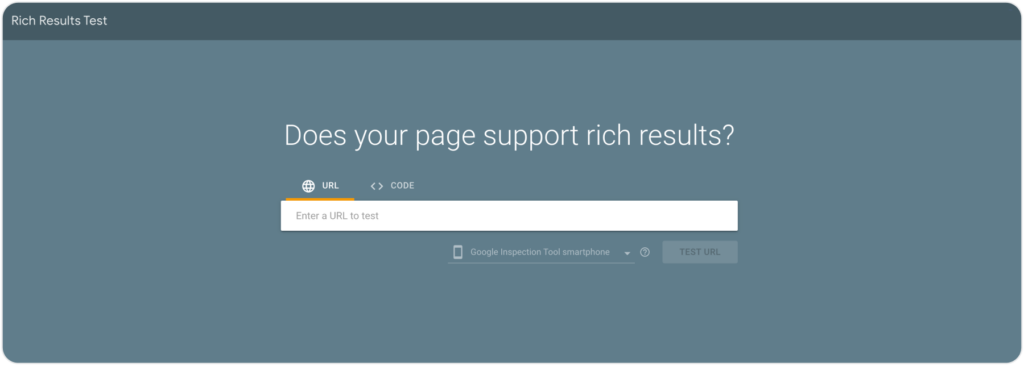
Enter your website URL and click “Test URL” to ensure there are no errors and that Google recognizes your markup.
You should also regularly check that your business information is up-to-date.
Update your schema markup whenever there are changes to your business details (e.g., new address, phone number, or business hours).
You should also add homepage schema markup.
This helps your business appear in the Knowledge Graph and ensures that your business information is accurate and easily accessible to search engines.
5. Optimize your business listings for voice search
Voice search is already popular, with 62% of US residents using voice-activated assistants like Siri, Google Assistant, and Alexa to find local businesses.
Optimizing your business listings for voice-activated search queries can significantly improve your chances of being seen for near me searches.
These searches are conversational and question-based, so using natural language and long-tail keywords in your GBP can improve your chances of ranking for these queries.
For example, an iPhone user searching for HVAC contractors would likely say, “Hey Siri, can you find an HVAC contractor near me?”
We tried this exact voice prompt and got the results below:
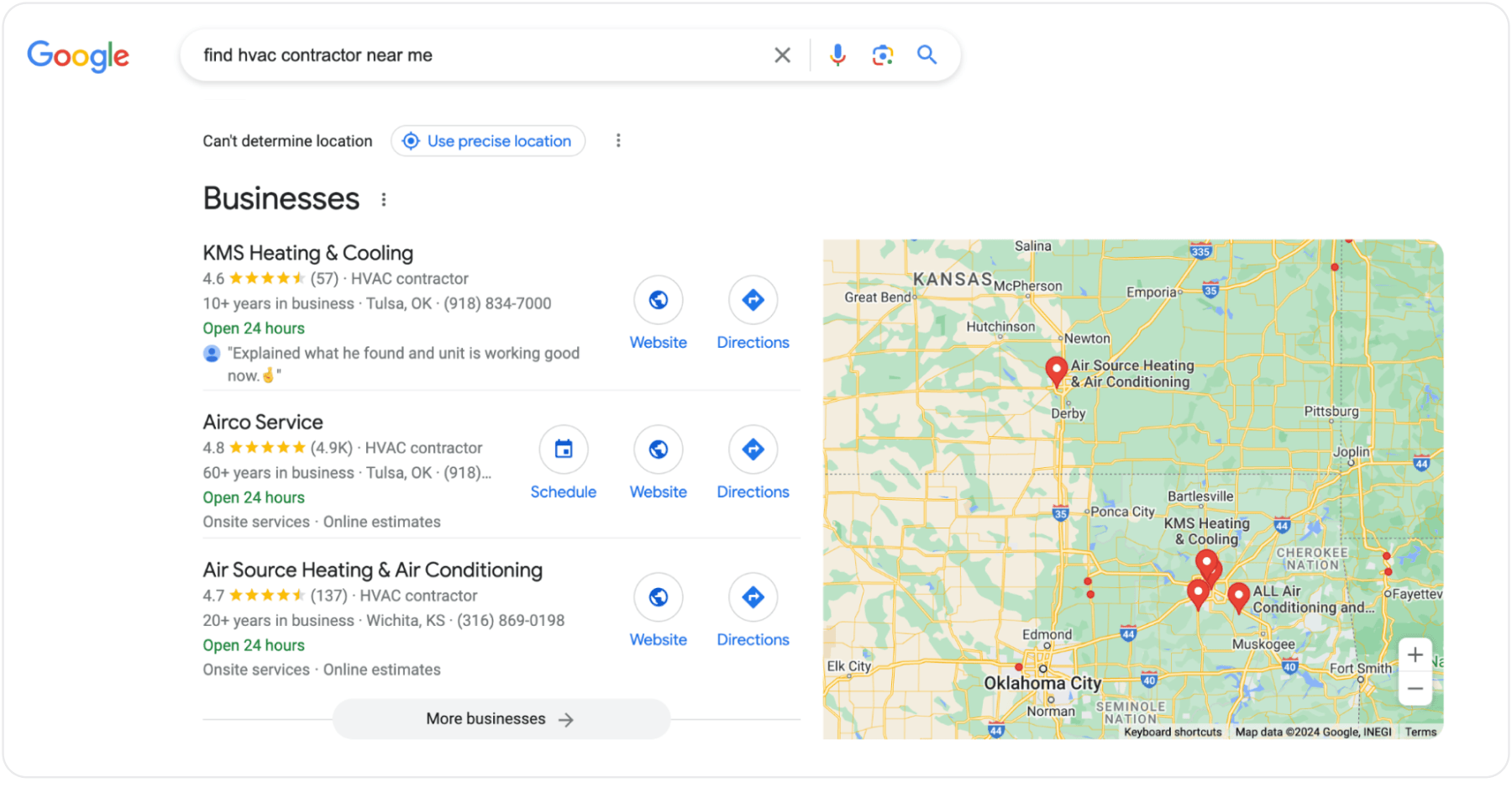
This works well since GPS is almost always enabled on up to 200 million adults in the US.
How to optimize your business listings for voice search
Use long-tail keywords that reflect natural speech patterns. For example, instead of “HVAC services,” use “Who offers the best AC repair near me now?”
Voice searches work best with an optimized Google Business Profile, so ensure it’s up-to-date with detailed descriptions, service areas, and recent photos.
Incorporate location-specific keywords and near me modifiers in your listings, such as:
- City-specific keywords, like “HVAC repair services in near me”
- Regional keywords, like “Central [Region] HVAC installation”
- District keywords, like “Heating repair near [District]”
- Emergency keywords like “Emergency AC repair near [Neighborhood]”
Mentioning landmarks, neighborhoods, or local events makes your business more relevant to local searches.
Rank for near me searches and attract more high-intent leads
So there you have it: five ways to optimize your GBP and website to rank for near me searches and attract people looking to compare solutions and hire the best option.
Along with local search ads and a website that loads fast and eliminates user friction, applying these tips consistently will help improve your rankings, traffic, and leads.
Keep in mind that Google is always updating its algorithm. It’s best to stay in the loop and update your site and GBP frequently to signal to Google that you produce helpful, relevant content for searchers.
Not sure if you can optimize your GBP, local listings, and website to rank for near me searches? It’s what we do!
FAQs about Near Me Searches
How do I show up on near me searches?
– If you haven’t already, claim your business on Google My Business and verify it.
– Fill out all the details accurately, including business name, address, phone number (NAP), website, hours of operation, and primary and secondary categories.
– Incorporate local HVAC SEO keywords in your business description and posts.
– Keep your listing updated with recent job photos, posts about local events, special offers, and any changes in business hours.
– Ask satisfied customers to leave positive reviews and respond to them promptly.
– Create separate pages for each location you serve
– Use local keywords naturally in your titles, headings, meta descriptions, and content
– Ensure your name, address, and phone number are consistent across your website and all online directories.
– Implement local business schema markup to help search engines understand your business details.
– Write blog posts about local events, news, and tips that are relevant to your audience
Where to use near me keywords?
Include near me keywords in
– URLs of your location and service pages
– Blog posts that address local issues or helpful DIY tips
– Title tags and meta descriptions to improve local search rankings
– Headings to structure your content and improve SEO
– Web copy, especially in the hero section and throughout the body text.
– Service and location pages that target “near me” searches
– GBP business name, description, updates, offers, and events.
– Anchor text for internal links to relevant service pages
– Local business schema markup to provide search engines with detailed information about your services and locations
Why doesn’t my business show up on near me?
Your business might not show up in near me searches because of an incomplete or poorly optimized Google Business Profile. As a result, Google will likely not see your business as relevant enough to show to locals. If you have multiple locations or a physical office address, set up an optimized Google Business Profile for each.