


You’re doing everything right—or so you think.
But your Google Business Profile (GBP) still isn’t showing up in the local pack, and your competitors seem to be in the lead, leaving you wondering what they’re doing that you’re not.
It might not be obvious, but subtle mistakes could be holding you back, costing you thousands of dollars in revenue. In this guide, we’ll uncover six common local SEO mistakes HVAC businesses make—and, more importantly, how to fix them.
Table of Contents
Local SEO mistake #1: Choosing the wrong GBP categories
Picking the right primary (and even secondary) categories increases your chances of ranking higher on Google Maps, making it easier for local homeowners to find your HVAC business.
Your primary category tells Google exactly what your business does.
It helps the search engine match you with the right user searches and decide where you appear in local results. Plus, Google almost always displays this category in the search results, making it one of the most critical ranking factors for local SEO.
For instance, if you search for ‘HVAC contractors in Cincinnati, Ohio,’ the local map pack typically shows businesses with “HVAC Contractor” as their primary category.
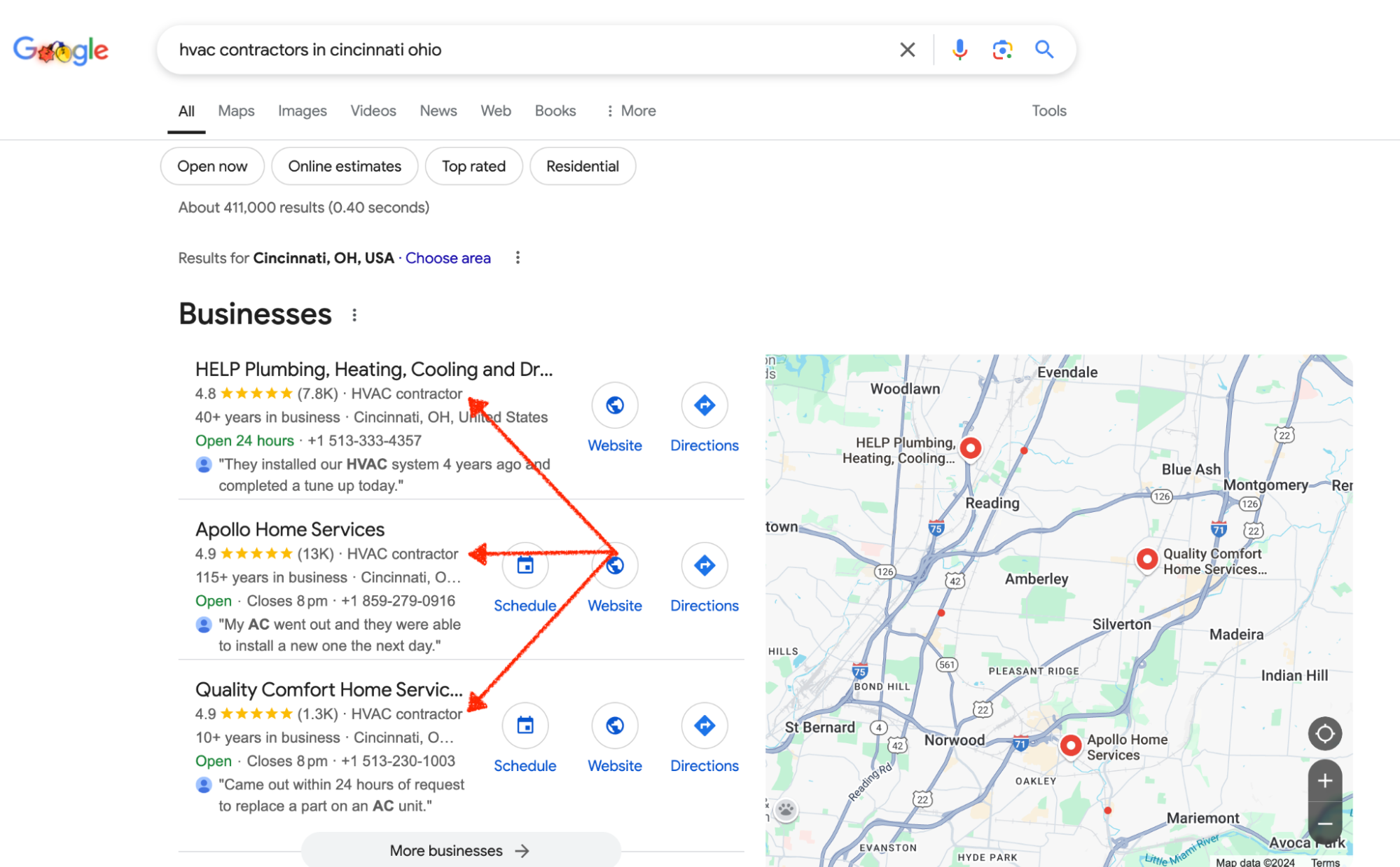
However, if you choose the wrong category, like “plumbing contractor” instead of “HVAC contractor,” your profile will likely appear under plumbing-related searches.
But if your business offers both services, you can set your main service as the primary category and the other as one of your secondary categories.
That’s exactly what Apollo Home did, and it helped them rank #2 on Google Maps for popular queries like ‘HVAC contractor’ and ‘plumbing contractor.’

How to fix the wrong GBP categorization
Fixing an incorrect GBP category is straightforward if your listing has been verified. If not, verify your Google business profile before proceeding.
1. Log into your Google Business Profile Manager
Next, sign into the account you used to create your Google Business profile.
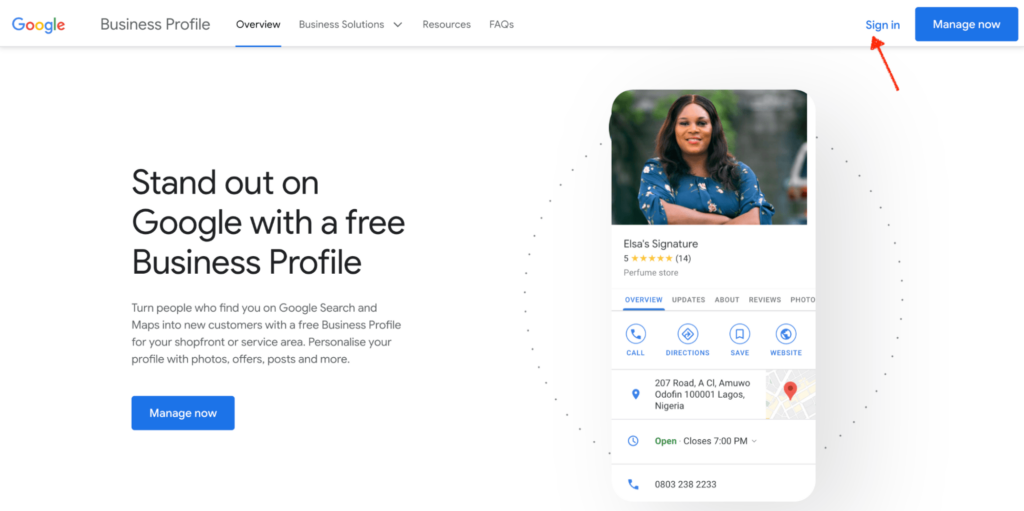
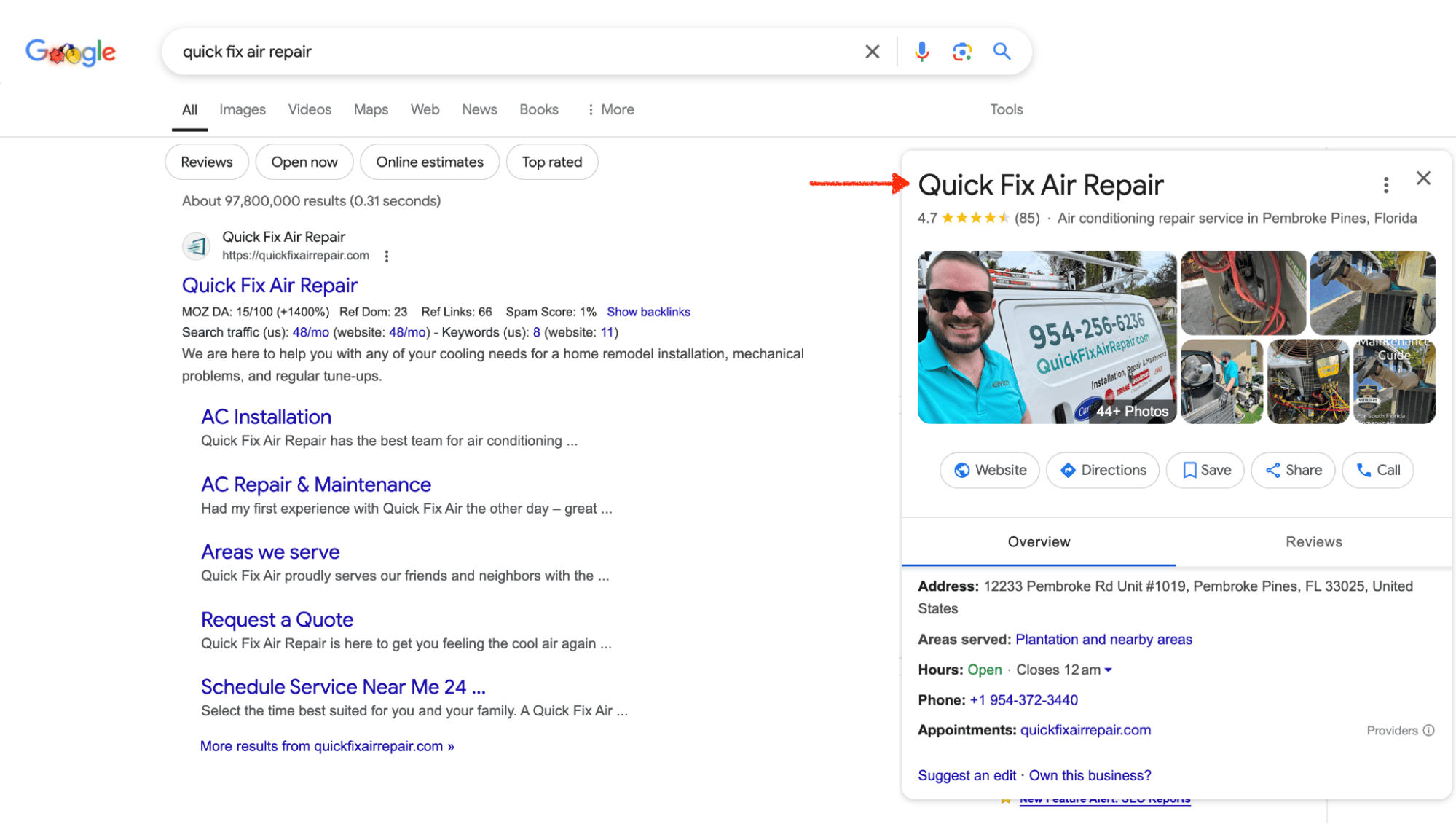
Alternatively, search Google for your exact business name to find your business profile and ensure there are no duplicates. Then click to view the profile.
2. Go to “Edit Profile” and update the “Categories” section
Select the location you want to update, click “Edit Profile,” and go to the “Categories” section.
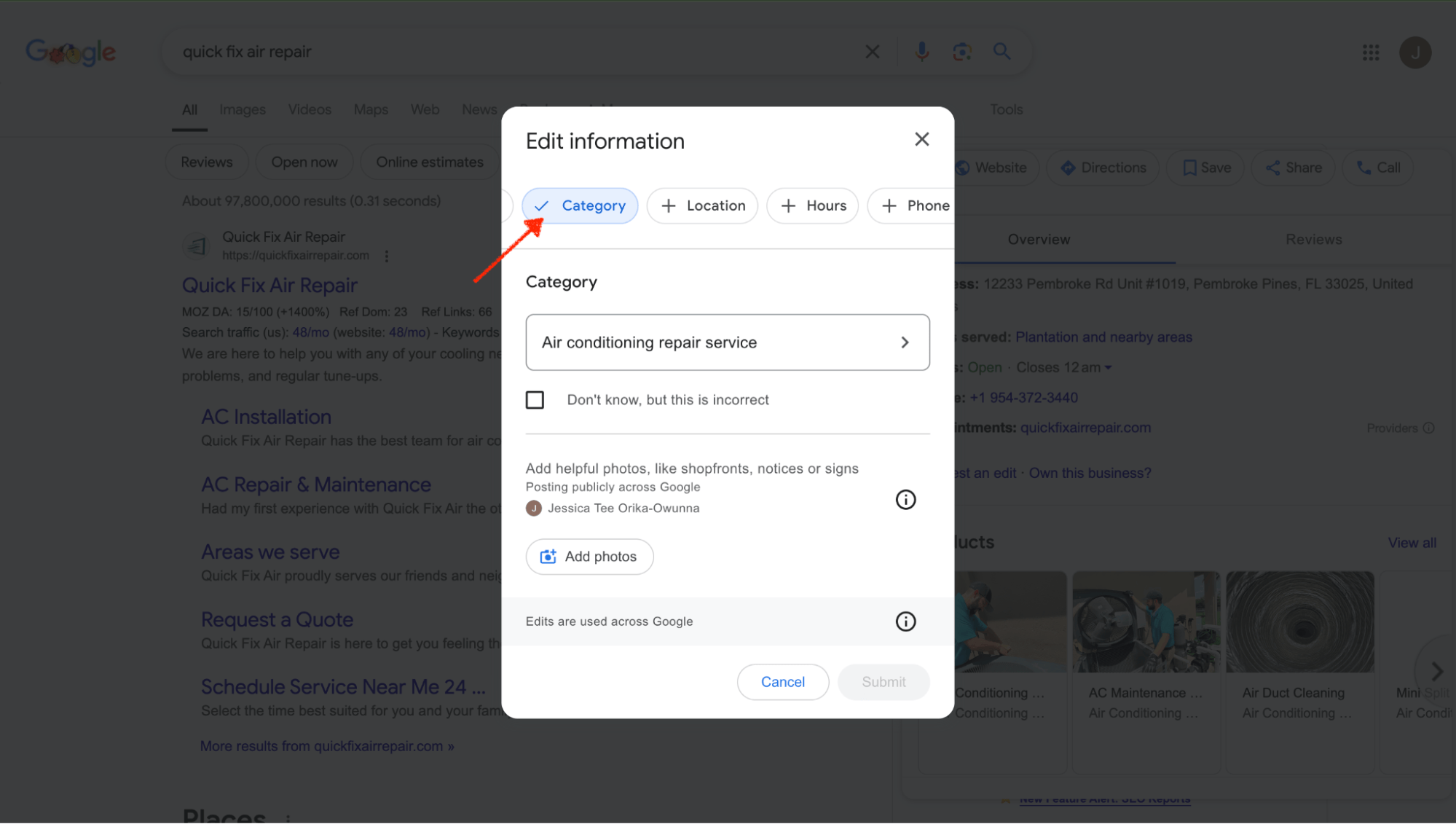
Click on the category and type the one that aligns with your core service.
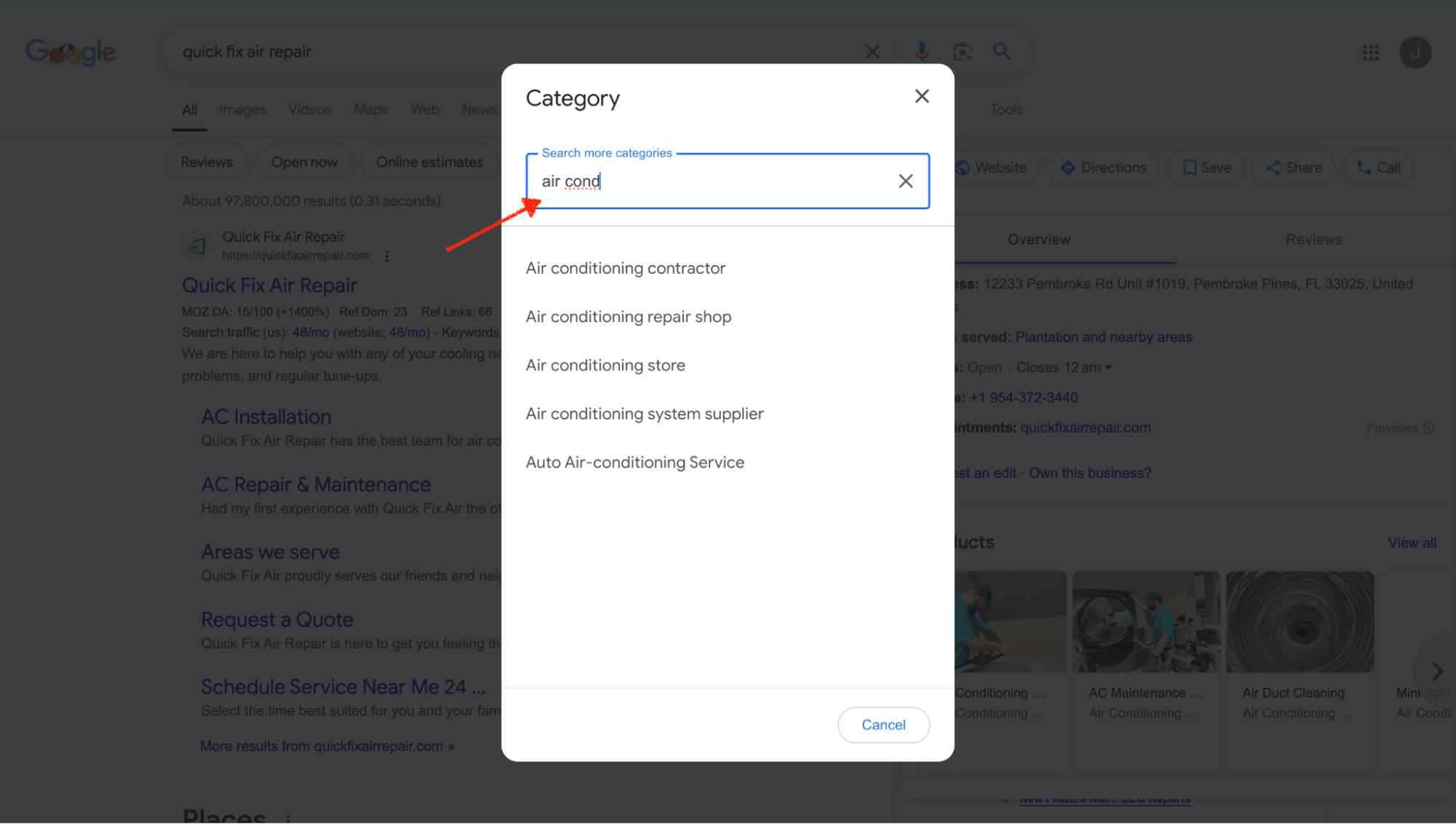
If you’re confused about which ones to choose, check out your competitors to see what keywords they are ranking for. Look at the top 3–5 competitors in your service area and note their primary and secondary categories.
To find out who your local search competitors are, type your core service and location into Bright Local’s free local search results checker to see who is ranking for them.
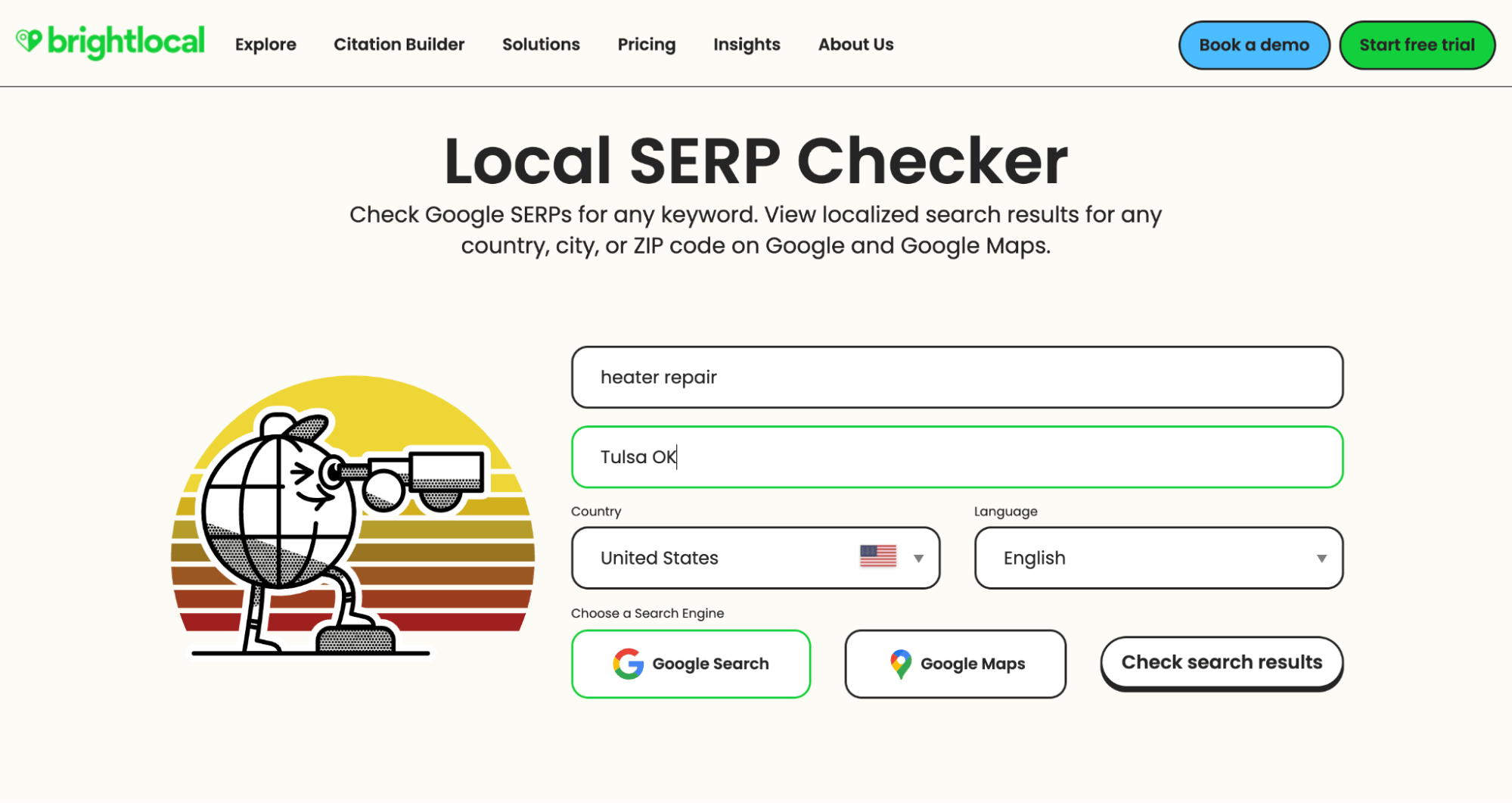
Click on ‘page 1’ to see the HVAC companies dominating the search results.
From the results, pick any of the companies from the map pack and use Semrush or Ahrefs to find out the keywords they are ranking for.
If you have multiple business locations, using the same primary category across all branches is fine. However, if your locations are close together, one might get filtered out of local results due to proximity.
To avoid this, diversify your categories.
For example, if two branches of your HVAC company are within 5 miles of each other, one could use “HVAC Contractor” as the primary category, while the other might use “Air Duct Cleaning Service” to stand out.
Targeting broad categories like “HVAC Contractor” may not work for highly competitive areas if established businesses already rank for them.
Instead, focus on niche categories to build visibility while growing your reputation.
For example, in a competitive market like Los Angeles, where HVAC contractors are abundant, targeting “Heating Contractor” or “Duct Cleaning Service” may help you rank for less competitive keywords and attract more customers.
3. Save your changes and monitor improvements using Google Insights
After updating your categories, click “Save” to submit your changes. Google typically reviews and approves updates within 24–48 hours. Once live, monitor your profile’s performance using Google Insights to track improvements regarding visibility and keyword traffic.
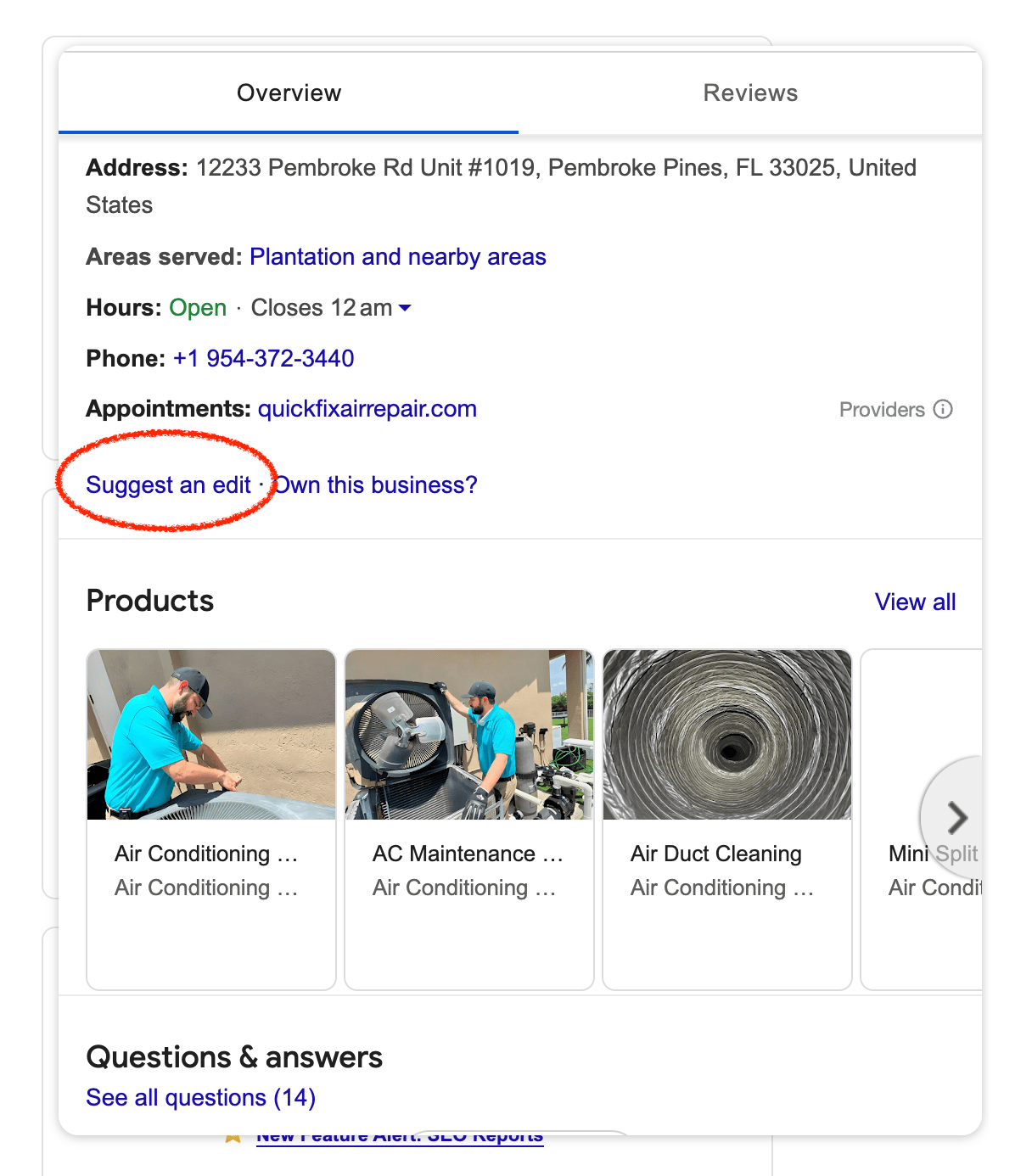
If Google continues to display the wrong category after your updates, use the “Suggest an Edit” option on Google Maps or the Knowledge Panel to propose a category correction. Then, edit and save the changes again if the updates haven’t gone through after 48 hours.
If the issue persists, visit the Google Business Support page to read articles on the subject or contact Google Support directly with screenshots and a detailed explanation of the issue.
Sometimes, unauthorized edits can occur, especially in competitive industries.
To avoid this, use tools like Visualping to monitor changes to your profile automatically and address them quickly if needed.
Local SEO mistake #2: Using inconsistent information on online listings
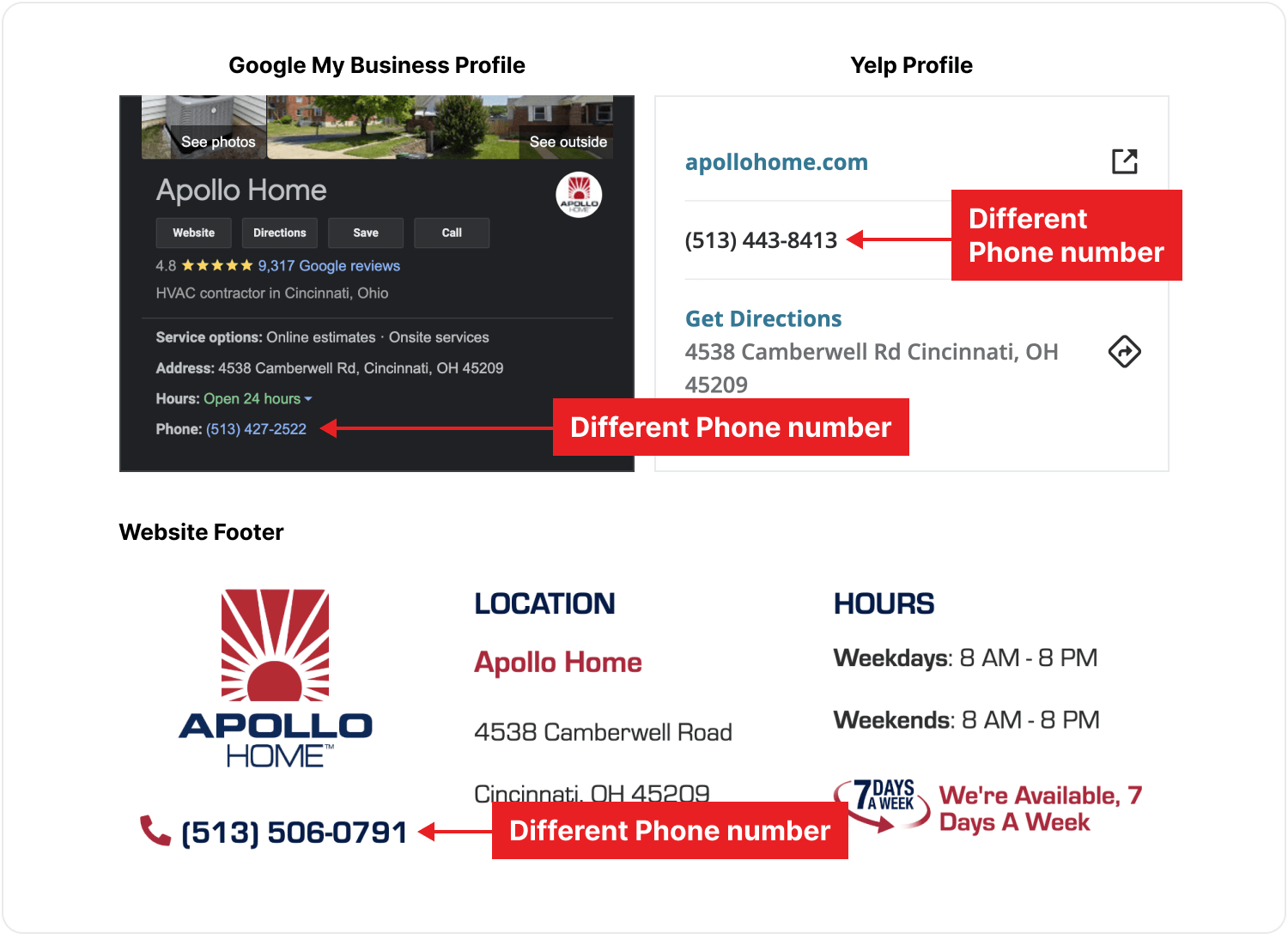
Search engines like Google rely on your business’s Name, Address, and Phone number (NAP) to verify its credibility and legitimacy.
If your NAP details are inconsistent across online listings, it can hurt your rankings and make it harder for people to find you.
But when critical information is inconsistent—like having different phone numbers or addresses on Google Maps, Yelp, and Facebook—it can confuse both search engines and customers.
Imagine calling a number that doesn’t work or showing up at an outdated address. Frustrating, right? That kind of experience typically results in negative reviews and lost business.
How to fix inconsistent information on online listings
- Identify all the platforms where your business is listed online. This includes Google Business Profile, Yelp, Facebook, Nextdoor, BBB, and other industry directories
- Use tools like Moz Local, BrightLocal, or Yext to find any inconsistencies, automate updates, and monitor changes across multiple directories
- Create a single, standardized version of your business Name, Address, Phone number, and other key details, like website URL and operating hours. Use the same format across all platforms, including the use of abbreviations or special characters
- Claim unverified listings. Some directories may auto-generate listings for your business without your knowledge. So, you should search for your business on major platforms and claim any unverified listings to control the information displayed.
- If you have duplicate listings, merge them to maintain a single, authoritative profile and avoid confusing search engines and customers
- After updating your listings, monitor your local SEO performance through tools like Google Insights, Google Analytics, or BrightLocal.
- Set a schedule to review your listings and fix any new discrepancies. Tools like Google Alerts or Visualping can notify you of changes.
Local SEO mistake #3: Using your personal address on your GBP
Displaying a personal address can make your HVAC business seem less credible and may even discourage potential customers from reaching out.
People searching for HVAC services expect to see a professional business address, and finding a residential one can raise doubts like, “Is this business legit?” or “Can I trust them with the job?”
Additionally, Google’s guidelines for GBP state that businesses without a physical storefront accessible to customers should set up their profile as a Service Area Business. Ignoring this can lead to your profile being flagged, suspended, or even penalized.
Google also prioritizes businesses with verified locations in its local rankings.
If you’re using a residential address for a business that primarily serves customers at their locations, it can reduce your visibility in search results and make it harder for potential customers to find you.
There’s also the risk of competitors reporting your business for non-compliance.
Once flagged, your profile could be suspended or removed entirely from Google Maps. This makes your business vulnerable to spam-fighting measures, which could hurt your reputation.
How to avoid using your personal address on your GBP
1. List your service area only instead of your address
If your business doesn’t have a permanent location, or you don’t receive customers at your business address, you can appear in Google Maps as a “Service Area” business.
Google recommends only listing service areas within two hours of your business’s location.
To do this:
- Log into your Google Business Profile Manager.
- Navigate to the Business Information section.
- Select “Edit Address” and check the option to clear your address.
- Define your service area by cities, regions, or zip codes.
This ensures you comply with Google’s guidelines and avoids potential penalties.
2. Use a virtual office address or coworking space
These provide a professional-looking business address that adds credibility while keeping your personal details private. Ensure the virtual address complies with Google’s guidelines and is properly registered as your business location.
3. Rent an office space, if you can afford it
You can rent a small office space in your area to use as your business address. This could cost between $700–$1,000 per month, depending on your city.
Local SEO mistake #4: Failing to request and respond to customer reviews
Google considers the quality, quantity, and recency of reviews when determining local rankings.
These reviews assure Google and prospects that your business is active and has been tested, trusted, and certified as reliable and effective. That’s why businesses with more reviews and ratings above 4.0 rank higher in the Local Pack and Google Maps results.
Responding to reviews (both positive and negative) also shows that you value customer feedback, which builds trust.
Not responding to negative reviews can give potential customers the impression that you don’t care about customer service, which can hurt your ability to attract new customers.

How to request and respond to customer reviews
The foundation of great reviews is excellent service, so ensure your team consistently delivers high-quality experiences that customers are excited to share. Then after the job is complete,
- Politely ask satisfied customers to leave a review on your Google Business Profile. Train your team to ask for reviews as part of the service process.
- Send a follow-up email or text with a direct link to your review page. Tools like Google’s Review Link Generator can help you create a direct link.
- Provide a QR code on invoices or business cards that customers can scan to leave a review quickly.
- Use tools like Birdeye, Podium, or Google’s Business Messages to automate review requests at scale while keeping the process personalized.
- Engage with customers by responding to every review. For positive reviews, thank the customer, mention specifics about their feedback, and encourage them to return. For negative reviews, acknowledge their frustration and offer to resolve the matter offline to show potential customers that you care about resolving problems.
- Share your best reviews on your website, social media, or email newsletters. This reinforces your credibility but also encourages others to leave reviews when they see how much you value customer feedback.
- Use tools like Google Business Insights or ReviewTrackers to track your review performance and trends in feedback to identify strengths and growth opportunities.
- Avoid offering incentives for reviews—Google may penalize your profile if you’re caught violating their review policies.
Local SEO mistake #5: Neglecting to optimize for voice search
Voice search is a huge part of how people find local businesses, with 58% of consumers using voice search. Optimizing for these queries helps you:
- Capture high-intent customers ready to act
- Stand out in the Local Pack and featured snippets
- Grow your local visibility and boost conversions
For example, someone might ask, “What are the best AC repair companies near me?” through Alexa, Google Assistant, Siri, or even ChatGPT’s voice feature instead of typing a query.
Voice assistants pull their answers from featured snippets or the top results in the Local Pack. If your business isn’t showing up in those spots, you’re losing out on mobile users who are ready to hire you almost instantly.
That’s why you should optimize your site and business profile for these conversational, question-based keywords, as well as the services themselves.
How to optimize for voice search
1. Focus on Natural, Conversational Keywords
Voice search queries are usually longer and sound more natural—think questions and complete sentences. Use tools like AnswerThePublic to find long-tail, question-based keywords your audience might use. Then optimize for phrases like “Who offers air conditioner repair near me?” or “What’s the best HVAC service in [city]?” in addition to broader keywords like “HVAC repair.”
2. Optimize your content for local SEO
Since most voice searches have local intent, make sure your content and listings reflect that.
- Use location-based keywords in your website content, meta descriptions, and GBP
- List your business on local directories like Yelp and Angi, ensuring the information matches your GBP
- Optimize to rank for near-me searches by clearly defining your service areas on your website and GBP
- Incorporate contextual keywords like “24/7 emergency repairs” or “affordable HVAC services” into your content and GBP
3. For informational keywords, aim for featured snippets
Voice assistants pull answers from featured snippets, so structuring your content to target these is key. To do this,
- Place concise, clear answers to common questions at the top of your pages
- Use bullet points, numbered lists, and clear headers to improve your chances of being featured
Local SEO mistake #6: Failing to talk about your local area enough on your website
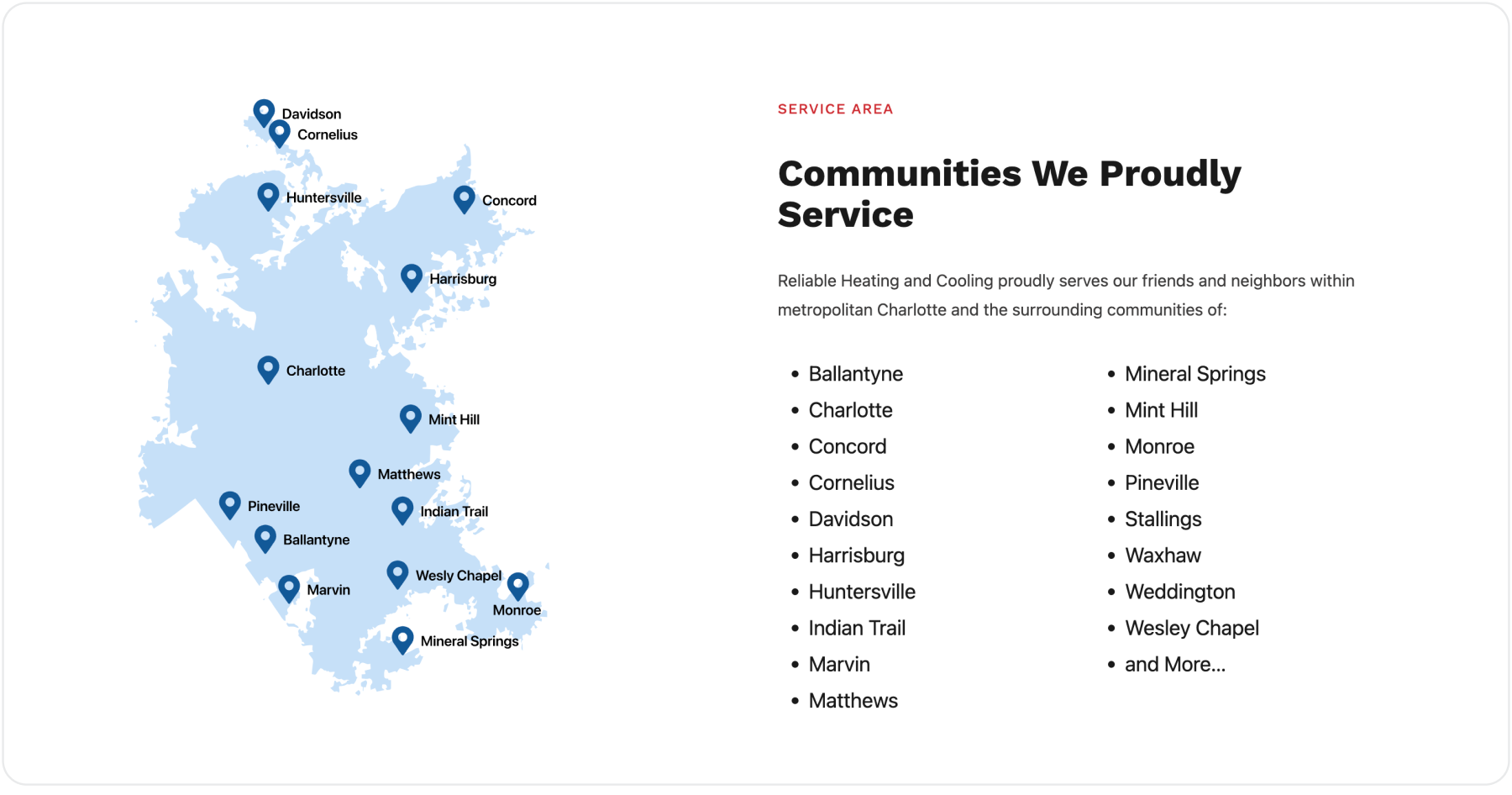
Search engines like Google prioritize websites that mention their service area when delivering results for local queries.
If your website doesn’t talk about the cities, neighborhoods, and regions you serve, you miss the opportunity to signal to Google that your business is relevant to those locations.
How to fix this mistake
To include location keywords throughout your site,
- Mention your city, neighborhood, and service area naturally in key sections like headers, titles, and meta descriptions. Use phrases like “[your core service] in [city].” Here’s a list of geo-targeting keywords you can use in your web copy and content.
- Build location landing pages for each city, neighborhood, or region you serve. And tailor the content on each page to highlight the services you provide in that specific area and reference local landmarks or community events.
- Incorporate mentions of your local area into your main service pages. For example, “We provide fast and reliable air conditioning repair in [city] and nearby neighborhoods like [neighborhood name].”
- Create blog content that answers location-specific questions or addresses local topics.
- Share customer reviews or testimonials in different parts of your service area on your landing pages.
- List your full address, phone number, and a map showing your location on your contact page or the footer section of each landing page, and mention the cities and neighborhoods you serve in your contact page content.
Partner with an expert to avoid local SEO mistakes
Now you know the six common local SEO mistakes that could be holding your business back—and, more importantly, how to fix them.
Here’s a quick recap of the key takeaways:
- Accurately represent your services by using your core service as your primary category and additional services as secondary categories.
- Standardize your business information (Name, Address, Phone number) across all online listings to build trust and avoid confusion.
- Use a service area listing or virtual office address to maintain credibility—avoid using a personal address.
- Request and respond to reviews regularly—both positive and negative reviews influence how high you rank in local results.
- Optimize for voice search by targeting conversational, long-tail keywords and ensuring your content is mobile-friendly.
- Incorporate location-based keywords and create landing pages tailored to specific service areas to improve local relevance.
Fixing these mistakes can take time, but the payoff is worth it: higher visibility, more customers, and increased revenue. If you need expert guidance, we’re here to help.
Our proven strategies have helped businesses like yours—such as Quick Fix Air Repair—dominate local search results and grow their revenue.
Ready to take your local SEO to the next level?
Schedule a free consultation today, and let’s make sure your business is the one customers find first.